




In Saudi Arabia, your work permit (often called Maktab Amal / Labor Office permit) is tightly linked to Iqama renewals and day-to-day compliance for expatriate employees. If fees aren’t paid or the permit isn’t valid, you may see delays or blocks when renewing the Iqama or completing employer services.
Key terms (so you know what you’re checking)
| Term | What it means in practice |
| Work Permit | The permit tied to an expatriate employee’s eligibility to work under an establishment. Issued/renewed via labor services (commonly referenced as Maktab Amal). |
| Maktab Amal fees | Common phrase for labor/work permit-related fees paid through government payment channels (often via SADAD through banks). |
| MHRSD | Ministry of Human Resources and Social Development (labor services owner). hrsd.gov.sa |
| Qiwa | Main digital platform for labor sector services and many employer workflows. qiwa.sa |
| Absher | MOI platform commonly used for resident services (Iqama-related visibility). absher.sa |
| SADAD | National electronic bill presentment and payment system used widely for government fees through banks/channels. sadad.com |
Official platforms: Qiwa (https://www.qiwa.sa/) and MHRSD (https://www.hrsd.gov.sa/) are the primary reference points for labor/work-permit related services; Absher is the primary MOI citizen/resident portal (https://www.absher.sa/); SADAD is the payment rail used through banks (https://www.sadad.com/).
What you need before you start (avoid failed lookups)
Have at least one of these identifiers ready (depending on the portal/service):
- Iqama number (for residents)
- Border number (for new arrivals or cases without an issued Iqama yet)
- Passport number (sometimes used in supporting checks)
- Employer/establishment details (CR number, establishment number) if you’re checking as HR/PRO in Qiwa
- SADAD bill reference/invoice number (if you’re checking payment status via your bank)
Best ways to check work permit / Maktab Amal fee payment status (2026)
At-a-glance: which method should you use?
| Method | Best for | What you can confirm | Typical requirement |
| Qiwa (Employer) | HR/PRO checking employees at scale | Work permit service status, actions, internal compliance workflow | Qiwa business account access |
| MHRSD e-services inquiry | Quick status check | Work permit details/status shown by the ministry | Iqama/border number |
| SADAD via bank/app | Confirming whether a fee was actually paid | Paid/unpaid, posting status, reference numbers | SADAD invoice/reference |
| Absher | Indirect verification (resident side) | Whether Iqama-related steps reflect updates (not a direct labor-office receipt) | Absher account |
Method 1: Check via Qiwa (most common for employers)
Qiwa is the central platform used by establishments for many labor services. Employers usually initiate or manage work-permit related actions here, especially for renewals and compliance workflows.
Steps (typical 2026 flow):
- Sign in to Qiwa using your establishment account.
- Go to the relevant service area (commonly under employee services / work permit-related services).
- Search by employee Iqama or employee record.
- Open the employee’s profile/service request.
- Review:
- Current status (issued / pending / requires action)
- Validity/expiry date (if displayed)
- Any payment reference or system prompts indicating fees due
When Qiwa is the best choice
- You are an employer/PRO managing multiple employees.
- You need to see why something is blocked (e.g., compliance requirements, missing steps), not just whether a payment happened.
Method 2: Check using MHRSD online inquiry (Labor Office / Maktab Amal)
For many users, the simplest “status check” is the MHRSD inquiry option (labor ministry e-services).
Steps (general):
- Visit the MHRSD portal and open e-services.
- Look for an inquiry service related to:
- Work permit / labor services inquiries
(names can vary slightly as portals are updated)
- Work permit / labor services inquiries
- Enter one identifier:
- Iqama number (common) or border number
- Complete verification (if prompted).
- Review results such as:
- Work permit status
- Permit number (if displayed)
- Related employer/establishment info (if displayed)
- Fee/payment prompts (if due)
Why this works well
- You’re an employee who wants a quick check without needing employer portal permissions.
- You only need a “paid vs not” / “valid vs not” directionally.
Method 3: Confirm fee payment via SADAD (through your bank/app)
Sometimes the ministry portal shows “pending” even after a bank payment, or your HR team says it’s paid but you want proof. That’s where SADAD is useful.
SADAD is the national bill payment network; in practice you access it through your Saudi bank app/ATM/online banking under Government Payments/SADAD.
Steps (bank app flow is usually similar):
- Open your banking app (or online banking).
- Go to Payments → SADAD / Government payments.
- Search for the relevant biller (the ministry/government entity) and enter the required reference (invoice/bill reference).
- Check:
- Payment status (paid/unpaid)
- Payment date/time
- Reference number (keep this for disputes)
Tip: If your bank shows the payment completed but the portal still doesn’t reflect it, save:
- Screenshot/receipt
- SADAD reference
- Date/time and amount
These are what HR/PRO or support teams typically need to escalate.
Method 4: Absher check (supporting, not a direct work-permit receipt)
Absher is an MOI platform used for resident services; it’s helpful to see whether Iqama-related updates are reflected, but it is not always the best “labor fee receipt” checker.
Use Absher when:
- Your goal is to confirm the resident-facing outcome (e.g., whether renewal-related blocks still exist).
- You want a second signal alongside Qiwa/MHRSD.
Common work permit/fee status messages and what to do
Exact wording varies by service, but these are the most common situations.
| What you see | What it usually means | What to do next |
| Fees due / payment required | A bill must be generated/paid before the permit can be issued/renewed | Ask employer/PRO to generate payment, then pay via SADAD (if applicable) |
| Pending / under process | Request exists but not fully completed (may be waiting system sync or action) | Recheck in Qiwa/MHRSD; verify SADAD receipt if payment was made |
| Issued / active / valid | Permit is successfully issued and currently valid | Note expiry date; align next renewal with Iqama cycle |
| Expired | Permit validity ended | Employer must renew; delays can impact Iqama processes |
| No record found | Data mismatch (wrong ID) or service not initiated | Re-enter correct Iqama/border no.; check with employer if request was ever started |
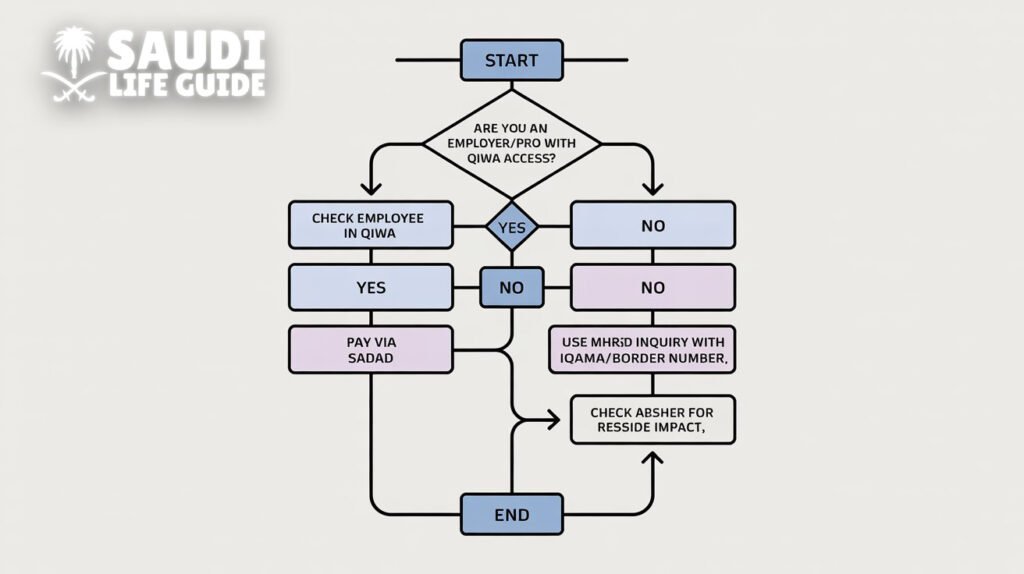
Practical workflow chart (fastest path to an answer)
Typical reasons your work permit fee status doesn’t update (and fixes)
- Wrong identifier used
- Fix: Confirm Iqama vs border number and that the digits match exactly.
- Payment completed but not posted
- Fix: Use the SADAD receipt and re-check on Qiwa/MHRSD later; if still unchanged, the employer/PRO can escalate with proof.
- Employer compliance blocks (Nitaqat/establishment constraints)
- Fix: Employer must resolve establishment-level requirements within Qiwa/MHRSD services.
- Multiple employees paid in bulk, wrong allocation
- Fix: Match payment references to the correct employee/permit request.
Fee planning: what employers typically track
Even when you’re only “checking status,” HR teams usually track these fields to prevent last-minute Iqama issues:
| Field to track | Why it matters |
| Employee Iqama number | Primary lookup key |
| Work permit expiry date | Renewal scheduling |
| Iqama expiry date | Often renewed in tandem; delays cause blocks |
| SADAD reference number | Proof of payment |
| Payment date | Helps resolve “paid but not updated” issues |
| Establishment account owner (Qiwa) | Who can take action |
FAQs
Can I check my work permit / Maktab Amal fee status myself as an employee?
Often yes, via MHRSD inquiry using your Iqama number (or border number in some cases). For deeper workflow details, employers typically see more inside Qiwa.
Is SADAD the same as “work permit status”?
No. SADAD confirms payment through the banking rail. The ministry portal confirms whether the service/permit is issued/updated. Use both if there’s a mismatch.
What if it shows “paid” in the bank but is still pending on the portal?
Save the receipt/reference and share it with your employer/PRO. Delays can occur due to posting/sync between systems; the receipt is the key evidence.
What’s the difference between a work permit and an Iqama?
They’re related but not identical: the work permit is a labor authorization; the Iqama is the residency card/permit. In practice, employers coordinate both to keep the employee fully compliant.
Do I need Absher to check Maktab Amal fees?
Not usually. Absher is more helpful for resident-facing services and confirming whether Iqama-related outcomes are progressing.
