


Last updated: 10 October 2026
“Linking a mobile number with your iqama” means two different things in Saudi Arabia: registering a SIM in your own name, which happens when you buy it, and registering your number on Absher, so that Absher, Nafath and government services send their codes to your phone. This guide covers both, plus how to see every number on your iqama.
1. Register a SIM in Your Own Name
Every SIM in Saudi Arabia must be registered to the holder’s ID and verified, either with a fingerprint at the shop or digitally through Nafath. Operators are required to verify your identity and documents.
In a shop (any network)
- Take your original, valid iqama to an operator store or authorised outlet.
- The shop scans your fingerprint and registers the SIM to your iqama number.
- The SIM is active once registration is complete.
Online
- stc self-activation SIM: in the mystc app, go to Store, Mobile and internet SIM, “Activate your SIM on your own”, scan the SIM or enter its serial, enter the PUK2, choose a package, enter your details and the code, confirm with Nafath, then pay (stc). A normal SIM is activated in a store or by a distributor.
- Zain: orders and transfers in the Zain app include an ID check and a Nafath step to confirm your fingerprint. Nafath works only inside Saudi Arabia (Zain help).
- Mobily eSIM: a new-number eSIM can be bought in the Mobily app or online shop; the limit on lines per ID also applies to eSIMs (Mobily).
- Salam: you need your iqama, an active mobile number and your Absher login to verify the SIM, or you can visit a Salam counter (Salam FAQ).
Jawwy is an stc brand, so the same stc rules apply. Expats can register a maximum of 2 prepaid SIMs on one iqama; see the SIM card limit in Saudi Arabia.
Follow Saudi Life Guide for Iqama, visa and job updates
New rules, fees and news as soon as we publish them. Join 60,000+ followers on Facebook.
2. Register or Change Your Mobile Number on Absher
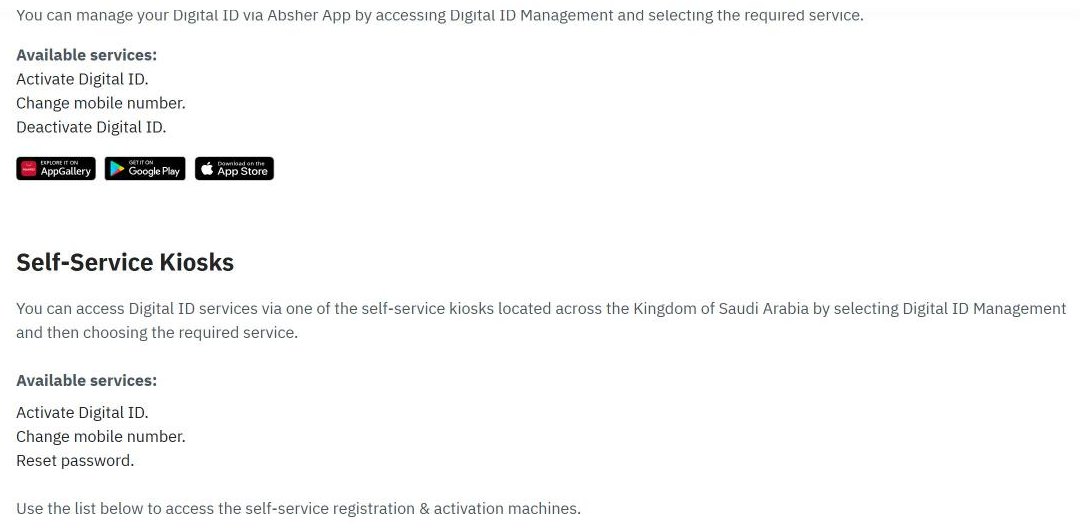
Absher lists the official channels for managing your digital ID on its Digital Identity Management and Activation Channels page:
If your old number still works
- Log in to Absher (website or app).
- Open your user information and enter the new mobile number.
- Save, then enter the code sent to the new number.
If you lost your old number (Absher app)
- Open the Absher app without logging in and choose Digital ID Management.
- Select Change mobile number and enter your iqama number and date of birth.
- Enter the new number, which must be active in your phone.
- Complete the biometric check with your phone’s camera.
In August 2026, Absher said the new number must be registered to you or to a first-degree relative, and that the phone’s front and rear cameras must work well for the check.
Self-service kiosks and Absher staff
- Absher kiosks: choose Digital ID Management, then change mobile number, and confirm with your fingerprint. Kiosks are in many Mobily shops, Jawazat and Civil Affairs offices, malls, hospitals and airports.
- Activation staff at Jawazat or Civil Affairs can change the number after checking your identity. If a kiosk cannot read your fingerprint, book a Jawazat appointment in Absher.
- Banks can activate an Absher account but cannot change its mobile number.
Rules to know
- One mobile number can be linked to only one Absher account. Using it on another account moves it there.
- A parent’s number cannot be used for family members’ Absher accounts.
- The Nafath app also lists an option to update the mobile number of your digital identity.
- Absher help line: 920020405.
Your bank also checks that the mobile number on your account belongs to you, using the national verification service required by SAMA (SAMA rule). Update your bank separately after changing your number.
3. Check Which Numbers Are on Your Iqama
- Use the free CST “Inquire about my numbers” service on the Mutasil portal or the CST app. Our guide shows the steps to check SIM cards on your iqama.
- Zain customers can send a blank SMS to 700123 (Zain).
- To see your own Mobily number, dial *222#. For other networks, check the number in the operator’s app or on the SIM pack.
- If a number on your iqama is not yours, ask the operator to cancel it and escalate to CST (19966) if it is not solved within five working days.
Related: how to register on Absher, check your Mobily balance and Jawwy balance check.
For stc balance, recharge and transfer codes, see the stc balance check guide.
Frequently Asked Questions
How do I link my mobile number with my iqama?
Two things are linked to your iqama. Your SIM is registered to your iqama when you buy it, with your fingerprint in the shop or Nafath online. Your Absher account uses one mobile number for its codes; you can change it in the Absher app, at an Absher self-service kiosk, or with activation staff at Jawazat or Civil Affairs.
How do I change my mobile number in Absher?
If your old number still works, log in and update it in your user information; a code is sent to the new number. If you lost the old number, use the Absher app before logging in (Digital ID Management, then Change mobile number, with a camera check), an Absher kiosk, or activation staff at Jawazat or Civil Affairs.
Can I use a number registered to someone else in Absher?
Absher says the number is your private number and can be linked to only one Absher account. In August 2026 Absher said the app route accepts a number registered to you or to a first-degree relative. Banks can activate Absher accounts but cannot change the number.
How do I check which numbers are registered with my iqama?
Use the free CST “Inquire about my numbers” service on the Mutasil portal or the CST app. It lists the active mobile numbers and data SIMs on your iqama with every network.
What if the shop cannot read my fingerprint?
Ask the shop about verifying through Nafath instead. For Absher, if the kiosk cannot read your fingerprint, book a Jawazat appointment on Absher and update your number with the staff there.
Sources: absher.sa Digital Identity Management and Activation Channels page and FAQ; Absher statements reported by Ajel (2026); Nafath app listing; stc self-activation SIM page; Zain help centre; Mobily eSIM page; Salam Mobile FAQ; CST; SAMA rulebook.