


Last updated: 16 October 2026
To download your GOSI certificate, open the Issue Wage e-certificate service on gosi.gov.sa, log in, choose the Certificate icon and then wages certificate. It is issued at once, it is free, and you can print it or save it as a PDF. The GOSI salary certificate (officially the wage e-certificate) shows your contribution periods and the wages registered for you with each employer, for Saudi and non-Saudi workers alike.
GOSI Certificate at a Glance
| Question | Answer |
|---|---|
| Official name | Wage e-certificate (also called the GOSI salary certificate) |
| Issued by | GOSI, the General Organization for Social Insurance |
| Where | gosi.gov.sa or the GOSI app |
| Log in with | GOSI username and password, or Absher (unified national access) |
| Cost | Free |
| Time | Issued at once |
| Who | Saudi and non-Saudi contributors |
Follow Saudi Life Guide for Iqama, visa and job updates
New rules, fees and news as soon as we publish them. Join 107,000+ followers on Facebook.
How to Download Your GOSI Salary Certificate on gosi.gov.sa
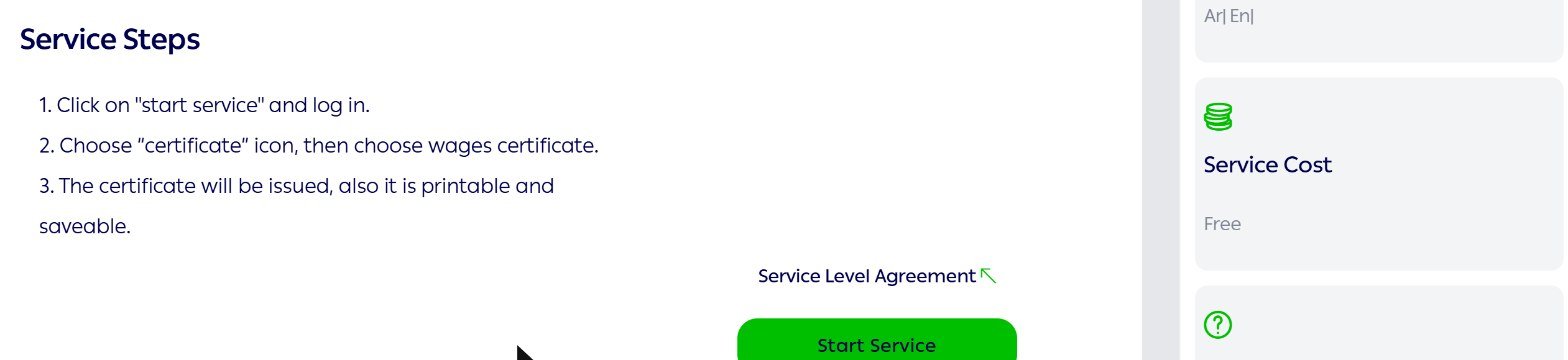
- Open the Issue Wage e-certificate page on gosi.gov.sa and click Start service.
- Log in with your GOSI username and password, or choose the unified national access through Absher. No Absher account yet? See our Absher registration guide.
- Choose the Certificate icon, then wages certificate.
- The certificate is issued straight away. Print it or save it as a PDF.
How to Get the GOSI Certificate in the App
The GOSI app lets you issue and display your digital documents, including the wage and contribution certificates, and share them. Download the official GOSI app from the App Store or Google Play, log in, open the certificates and issue the wage certificate. Older guides still call the app Taminaty.
What the GOSI Wage Certificate Shows
- Your name and ID or Iqama number
- Each employer you have been registered with
- Your contribution periods with each employer
- The wage registered for you with GOSI
The wage on the certificate is the amount your employer registered with GOSI, which may differ from what you are actually paid if your employer has not updated it.
Wage Certificate or Contribution Certificate?
GOSI has two separate certificate services. The wage e-certificate shows your employment periods and wages, and it is the one banks, landlords and most offices mean by a GOSI salary certificate. The contribution e-certificate is a different service. If you are not sure, ask the bank or office which certificate it needs before you issue one.
When You Need a GOSI Certificate
- Bank loans and credit cards: many lenders ask for it with your salary certificate. Check your MOLIM credit report before you apply, and compare the best banks for expats.
- Family visas: a salary or GOSI certificate is one of the documents for the permanent family visa.
- Salary disputes: it shows which employer registered you and at what wage. See what to do if your employer is not paying your salary. It is also useful proof if you resign without notice under Article 81.
- Leaving a job: your registered periods help you check your end of service amount with our end of service calculator.
GOSI Contributions for Expats
For non-Saudi workers, the employer pays a 2% contribution for occupational hazards insurance, and nothing is deducted from the worker’s salary for GOSI. This insurance covers work injuries and occupational diseases. Expats are not part of the GOSI pension (annuities) system.
GOSI Certificate Problems and Fixes
| Problem | What to do |
|---|---|
| Certificate missing a job or period | Your employer did not register you for that period. Ask HR in writing to register or correct it with GOSI. |
| Wrong salary on the certificate | The employer registered a different wage. Only the employer can update it. |
| Cannot log in | Use the Absher login, and check that your Absher account is active and your mobile number is up to date. |
| Still stuck | Use the Ask Ameen service or Contact us on gosi.gov.sa. |
Frequently Asked Questions
How do I download my GOSI certificate?
Go to the Issue Wage e-certificate service on gosi.gov.sa, click Start service and log in with your GOSI username and password or through Absher. Choose the Certificate icon, then wages certificate. The certificate is issued at once and you can print it or save it as a PDF. You can also issue it in the GOSI app.
Is the GOSI salary certificate free?
Yes. GOSI lists the cost of the Issue Wage e-certificate service as free. You do not have to visit a GOSI branch or pay anyone to download it, so ignore offers from agents who charge a fee to get the certificate for you.
Can expats download the GOSI salary certificate?
Yes. The wage e-certificate covers both Saudi and non-Saudi contributors. Expats registered by their employer log in with their GOSI account or through Absher, so you need an active Absher account linked to your Iqama before you start.
What is the difference between the GOSI wage certificate and the contribution certificate?
The wage e-certificate shows your contribution periods and the wages registered for you with each employer. The contribution e-certificate is a separate GOSI service. Banks and landlords asking for proof of salary usually want the wage certificate, so check which one the requester needs before you issue it.
Why is the salary on my GOSI certificate wrong or missing?
The certificate shows the wage your employer registered with GOSI. If the amount is wrong, or a job period is missing, your employer has to correct its GOSI records; you cannot change them yourself. Ask your HR department in writing, and if the problem continues, use the Ask Ameen service on gosi.gov.sa.
Do banks accept the GOSI salary certificate?
Many banks and finance companies in Saudi Arabia ask for a GOSI wage certificate, along with a salary certificate from your employer, when you apply for a personal loan, credit card or car finance. Your credit report on MOLIM matters too, so check it before you apply.
Want to know what your job pays elsewhere? See the Saudi Arabia salary guide.
Sources: GOSI, Issue Wage e-certificate and Issue Contribution e-certificate services and individual services page (gosi.gov.sa); GOSI app listing (App Store).