



Last updated: 8 November 2026
The GOSI app now works in seven more languages: Urdu, Bengali, Filipino, Hindi, Sinhala, Nepali and Indonesian. The General Organization for Social Insurance announced the change on 28 October 2026, saying it is aimed at customers who speak neither Arabic nor English. All seven are in the app through a feature called Lite Mode, and three of them are already live on the GOSI website.
For millions of expat workers in Saudi Arabia, this is a small change with a practical payoff. Checking your own social insurance record no longer needs a colleague to translate.
What changed in the GOSI app languages
Until now, GOSI’s digital channels were offered only in Arabic and English. The new update adds seven languages spoken widely by the Kingdom’s expat workforce.
| Channel | Languages available |
|---|---|
| GOSI app (Lite Mode) | Arabic, English plus all seven new languages: Urdu, Bengali, Filipino, Hindi, Sinhala, Nepali, Indonesian |
| GOSI Individual website (login page) | Arabic, English plus all seven new languages in the language menu |
When it announced the change, GOSI said three of the new languages were on its website. By November 2026, the language menu at the top right of the GOSI Individual login page lists all nine: English, Filipino (Tagalog), Urdu, Bengali, Arabic, Hindi, Nepali, Sinhala and Bahasa Indonesia. You log in with your Absher details, either through the National Single Sign-On (Nafath) button or with your Absher username and password. GOSI has not explained whether Lite Mode in the app carries every service in the full app or a simplified set.
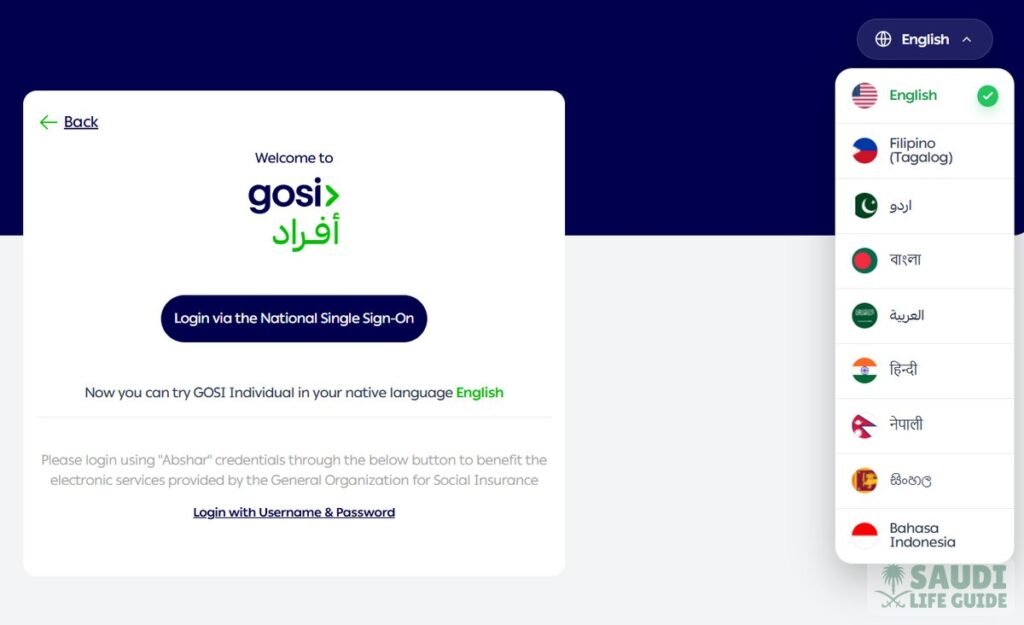
According to the announcement, users can read about their insurance rights and obligations in their own language and complete procedures and requests, including compensation and work injury services.
Follow Saudi Life Guide for Iqama, visa and job updates
New rules, fees and news as soon as we publish them. Join 107,000+ followers on Facebook.
Who is affected
The update matters most to workers from South and Southeast Asia, who make up a large share of private sector employees in the Kingdom. Many expats in Saudi Arabia only open the GOSI app when something has already gone wrong, such as an injury at work or a salary dispute, and that is exactly when a language barrier hurts most.
For most expat employees, GOSI’s main role is the occupational hazards branch, which covers work injuries and is paid by the employer. Your GOSI record also shows the salary your employer has registered for you, which can matter in labour disputes and end of service calculations.
What expats should do now
- Update the GOSI app. Install the latest version from the App Store or Google Play, then look for Lite Mode to switch language. On the website, use the language button at the top right of the GOSI Individual login page.
- Check your registration. Confirm your employer has registered you and that the start date is correct.
- Compare your registered salary. The wage on your GOSI record should match your contract. If it does not, raise it with HR first, then with the Ministry of Human Resources if needed.
- Know the work injury route. If you are hurt at work, make sure your employer reports it to GOSI. You can now follow the request in your own language.
- Help a colleague. If you share housing with workers who struggle with English, show them the new option. In practice, this is how most people find out about features like this.
What has not changed
Contribution rates, coverage rules and who pays for what are the same. Only the language options are new. Official information remains on the GOSI website, and labour complaints still go through the Ministry of Human Resources and Social Development.
If you have avoided the GOSI app because of the language, now is a good time to open it and check your record.
What GOSI covers for expat workers
For non-Saudi employees, only the occupational hazards branch applies. GOSI says this branch compulsorily covers all Saudi and non-Saudi workers, and the contribution for it is 2% of the wage, paid by the employer. Nothing is deducted from an expat’s salary for GOSI, and expats are not part of the pension (annuities) branch.
Your employer must register you with GOSI within the first 15 days of the month after the month you start work. If you joined in March, for example, your registration should be in place by mid April. This is a good reason to open the app a few weeks after you join and confirm your record is there.
If you are injured at work: the key deadlines
Language was a real barrier here, so these rules are worth knowing in any language. According to GOSI:
- Tell your employer within 7 days of the injury, or ask someone to do it for you. Reporting late can cost you the daily allowance for the days before you reported, unless GOSI accepts your reason.
- Your employer must report it within 3 days of being told, for any injury that needs more than first aid.
- Treatment is free for you. GOSI provides medical care through hospitals and clinics it owns or contracts with, without charging the injured worker.
- You are paid while you cannot work. The daily allowance is 100% of your daily wage in the month before the injury, reduced to 75% while you are being treated at GOSI’s expense.
GOSI also states that an employer’s failure to pay contributions does not take away the worker’s right to benefits. If your employer delays the report, keep copies of hospital papers and messages showing when you told them.
Using your GOSI record in other matters
Your GOSI record is often asked for outside GOSI itself. Banks, embassies and new employers may want proof of your registered wage, which you can download as a certificate. Our guide to the GOSI salary certificate shows the steps. Logging in usually goes through Nafath, so make sure your Nafath app is active first.
If the salary on your GOSI record is lower than your contract, it can affect how disputes are handled. Use our end of service benefit calculator with your contract salary to see what is at stake, and if your pay is late, see our guide on what to do when your employer is not paying salary.
Contacting GOSI
For questions about your GOSI record, use the contact options on the official GOSI website or app, and have your iqama number ready. Keep a note of any request or ticket number you are given. Labour disputes about pay or contracts still go to the Ministry of Human Resources and Social Development, not to GOSI.
Frequently asked questions
Which languages does the GOSI app support now?
Arabic and English, plus Urdu, Bengali, Filipino, Hindi, Sinhala, Nepali and Indonesian through Lite Mode in the app. The same nine languages are in the language menu on the GOSI Individual website login page.
Do expats pay GOSI from their salary?
No. For non-Saudi workers, the 2% occupational hazards contribution is paid by the employer.
How soon must a work injury be reported?
The worker should tell the employer within 7 days, and the employer must report it to GOSI within 3 days of knowing about it.
How quickly must my employer register me with GOSI?
Within the first 15 days of the month after the month you started work.