



Last updated: 10 October 2026
Jawwy does not have an official balance check code. To check your Jawwy balance, data and plan validity, open the Jawwy app or log in at jawwy.sa. Jawwy, which is run by stc, says in its terms that usage is monitored through the app and the website. Codes such as *888#, 8885# or “BAL to 900” that appear on other sites are not Jawwy codes.
How to Check Jawwy Balance and Data
1. In the Jawwy app
- Open the Jawwy app (App Store or Google Play) and log in with your Jawwy number.
- Your account shows your wallet balance, your current plan with its validity, and the data and minutes remaining.
- Open Wallet to see your current balance, recharge or manage it.
2. On jawwy.sa, without the app
Go to jawwy.sa, select Login, and enter your Jawwy number and the code sent to you by SMS. The website shows the same balance, plan and usage as the app. This is the way to check if your phone cannot run the app.
3. Usage alerts
Jawwy sends an alert in the app or by SMS when you have used 80% of your plan, so you know when to renew or add data.
What about *166# and other codes?
*166# is the balance code for stc lines. Jawwy runs on stc’s network, but Jawwy does not list *166# or any other dial code for its customers, so it may not work on a Jawwy SIM. Use the app or website.
Follow Saudi Life Guide for Iqama, visa and job updates
New rules, fees and news as soon as we publish them. Join 101,000+ followers on Facebook.
Jawwy Plans
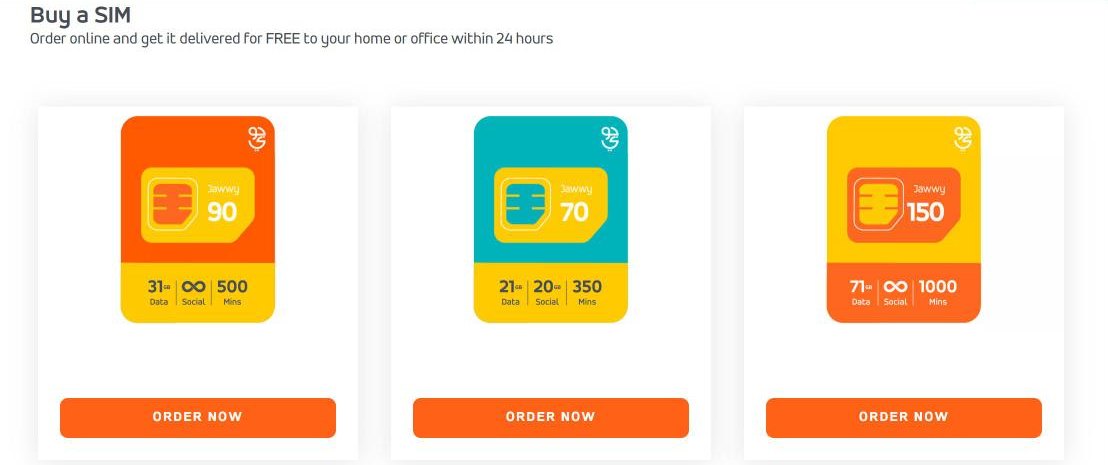
These are the plans shown on the jawwy.sa home page on 10 October 2026:
| Plan | Data | Social media data | Local minutes |
|---|---|---|---|
| Jawwy 70 | 21 GB | 20 GB | 350 |
| Jawwy 90 | 31 GB | Unlimited | 500 |
| Jawwy 150 | 71 GB | Unlimited | 1,000 |
- Jawwy also sells Jawwy 45, 110 and 200 plans, Flex plans that you build yourself (Jawwy says all Flex plans include 3,000 Jawwy-to-Jawwy minutes), data-only SIMs for 4, 8, 12 or 24 weeks, and eSIM versions of its plans.
- Prices and validity are shown in the app’s shop. Check them there before you buy, because Jawwy changes its offers.
- Visitors on a visit visa can buy prepaid lines only.
Jawwy and VAT: Why Your Recharge Seems Higher
Jawwy charges the 15% VAT when you recharge your wallet, not when you buy a plan (Jawwy terms). So when you top up, part of the amount goes to VAT, and the plan is then paid from the wallet with no further tax.
Jawwy sells packages only. Local calls and data need a plan or an add-on; the wallet balance pays for things like international calls and roaming without a plan.
How to Recharge Jawwy
- Card or digital recharge: in the app or on jawwy.sa, choose Recharge and enter an amount from SAR 10 to SAR 10,000. Pay by Visa, Mastercard, mada, Apple Pay, stc pay or Qitaf points.
- stc Sawa recharge card: choose Sawa recharge in the app or website and type the voucher code from the back of the card.
- For someone else: you can recharge a friend’s Jawwy number in the same way. Only Jawwy numbers can be recharged.
- eSIM lines: recharges are by electronic payment only.
Jawwy also lets you gift data and minutes to other Jawwy users and share one plan with up to three devices.
Jawwy Validity Rules
- Your number stays valid for 90 days from your last paid activity, such as using data, sending a message, making a call or recharging.
- A new SIM must be activated in the Jawwy app within 90 days of purchase, or the service is cancelled.
- Wallet balance stays usable for one year after you cancel the last number on your account.
How to Find Your Jawwy Number
Your number appears in your account in the Jawwy app and on jawwy.sa. To see every mobile number registered to your iqama, with all networks, use the free CST “Inquire about my numbers” service. Our guide shows how to check SIM cards on your iqama.
Jawwy eSIM
You can order a Jawwy eSIM in the app, either as a new number or to replace your physical SIM. The app verifies your identity through Nafath and then gives you a QR code to add the eSIM in your phone settings. Jawwy’s eSIM page lists supported phones, including iPhone XS and later, Samsung Galaxy S20 and later, and some Huawei, Honor, Xiaomi and Motorola models.
Contact Jawwy Customer Care
- Jawwy support is digital only: chat in the Jawwy app, the contact page on jawwy.sa, and Jawwy’s social media accounts (@jawwy on X).
- There is no Jawwy phone line. The number 900 is stc’s customer care number.
- Complaints can be raised in the app, on the website or at a sales outlet within 60 days. If a complaint is not resolved within five days, you can escalate it to CST.
Jawwy SIMs are delivered free within 24 hours when you order online, and are also sold through stc’s traditional channels.
Jawwy runs on stc’s network. For stc Sawa lines, see the stc balance check and service codes.
Frequently Asked Questions
What is the Jawwy balance check code?
Jawwy does not publish a balance check code. Check your balance, data and plan validity in the Jawwy app or by logging in at jawwy.sa. *166# is stc’s balance code and is not listed for Jawwy lines.
How can I check my Jawwy balance without the app?
Log in at jawwy.sa with your Jawwy number and the code sent to you by SMS. The website shows the same wallet balance, plan and remaining data as the app.
How do I recharge Jawwy?
In the Jawwy app or on jawwy.sa, choose Recharge and pay between SAR 10 and SAR 10,000 by card, mada, Apple Pay, stc pay or Qitaf points. You can also enter the voucher code of an stc Sawa recharge card under Sawa recharge.
How long does a Jawwy number stay valid?
A Jawwy number stays valid for 90 days from your last paid activity, such as using data, sending a message, making a call or recharging. Wallet balance remains usable for one year after you cancel the last number on your account.
What is the Jawwy customer care number?
Jawwy has no customer care phone line. Support is through chat in the Jawwy app, the jawwy.sa website and Jawwy’s social media accounts, such as @jawwy on X. The number 900 belongs to stc.
Comparing networks? See how to check your Mobily balance and data, the Mobily service codes and our guide to internet packages in Saudi Arabia.
Sources: jawwy.sa home page, terms and conditions, eSIM page and contact page; Jawwy app listings on the App Store and Google Play; stc Budget Control page; CST “Inquire about my numbers”.
