



Managing domestic worker affairs in Saudi Arabia requires a clear understanding of the Maktab Amal system. Whether you are hiring for the first time or renewing a contract, knowing the Maktab Amal fee, its breakdown, and how to pay it is essential for compliance. If you need to visit in person, our guide to Maktab Amal offices, working hours and helpline numbers covers every city.
Useful tool: Estimate a domestic worker’s Iqama and permit costs with our Iqama fees calculator (choose “Domestic worker”).
Maktab Amal (مكتب العمل) is the everyday name for the labour office of the Ministry of Human Resources and Social Development (HRSD). For what the office does, its branches, working hours and appointments, see our guide to Maktab Amal (Labour Office). This page covers the fees: what you pay, how to check the amount, how to pay it and how to confirm your payment status.
Maktab Amal Fee Structure 2026
Understanding the current fee structure helps employers budget appropriately. Below is the updated fee table for 2026:
These are domestic labour rates. If you are a company-sponsored employee, see the full 2026 iqama fee breakdown instead, where work permit and dependent levy costs are different.
Table 1: Maktab Amal Service Fees 2026
| Service Type | Fee Amount (SAR) | Processing Time |
| New Work Permit | 600 | 3-5 working days |
| Work Permit Renewal (Annual) | 600 | 1-3 working days |
| Sponsorship Transfer (paid by the new employer) | 2,000 first time, 4,000 second, 6,000 third | After all approvals in Qiwa |
| Exit and Re-entry Visa (Single) | 200 | Immediate |
| Exit and Re-entry Visa (Multiple) | 500 | Immediate |
| Final Exit Visa | 200 | Immediate |
| Profession Change | 1,000 | 5-10 working days |
| Lost Iqama Replacement | 1,000 | 3-5 working days |
Additional Fees to Consider
| Expense Category | Estimated Cost (SAR) |
| Medical Insurance (Annual) | Varies by class; average about 3,303 per insured person (Insurance Authority, 2025) |
| Iqama Issuance/Renewal | 650 |
| SADAD Transaction Fee | 2-5 |
| Late Renewal Penalty (per day) | 100 |
Follow Saudi Life Guide for Iqama, visa and job updates
New rules, fees and news as soon as we publish them. Join 95,500+ followers on Facebook.
How to Check Maktab Amal Fee Online
Before making any payment, verifying the exact fee amount prevents overpayment or underpayment issues. Here are three reliable methods to check your Maktab Amal fees:
Method 1: Through the Absher Platform
The most convenient way to check fees is through the Absher portal:
Step-by-Step Process:
- Visit absher.sa or download the Absher app
- Log in using your National ID/Iqama number and password
- Navigate to “E-Services” → “Individuals.”
- Select “Passport Services” or “Labor Services”
- Click on “Query Services”
- Enter your domestic worker’s Iqama number
- View all pending fees and their breakdown
Method 2: Via MOL Website (Qiwa Platform)
For detailed labor-related fee information:
- Access qiwa.sa
- Register or log in with your credentials
- Select “Domestic Labor Services”
- Enter worker details (Iqama number, border number)
- Review displayed fee information
Method 3: SADAD Bill Inquiry
Check pending bills directly through SADAD:
- Log in to your online banking portal
- Navigate to SADAD Payments
- Select “Ministry of Labor” as the biller
- Enter your Iqama number or the worker’s Iqama
- View all outstanding bills with amounts
How to Pay Maktab Amal Fee: 5 Payment Methods
Saudi Arabia offers multiple convenient payment channels for Maktab Amal fees. Choose the method that suits you best:
1. Online Payment Through Absher
The fastest and most recommended method:
- Step 1: Log in to Absher → Individuals
- Step 2: Go to E-Services → Payments
- Step 3: Select “Pay Government Fees”
- Step 4: Choose “Ministry of Labor” from the list
- Step 5: Enter the worker’s Iqama number
- Step 6: Verify fee details
- Step 7: Select payment method (MADA/Visa/Mastercard)
- Step 8: Complete payment and save receipt
Processing Time: Instant confirmation
2. SADAD Payment System
SADAD is integrated with all Saudi banks and offers reliable payment processing:
Through Online Banking:
- Log in to your bank’s online portal
- Navigate to SADAD Payments
- Search for “Ministry of Labor” (Biller Code: 007)
- Enter bill number or worker’s Iqama
- Confirm and pay
Through Mobile Banking Apps:
- Open your bank’s mobile application
- Select SADAD → Government Services
- Follow similar steps to online banking
Payments do not always appear instantly. Once the transaction clears, check your Maktab Amal fee payment status before assuming the renewal has gone through.
3. Bank ATM Payment
For those preferring physical transactions:
- Insert your MADA card at any Saudi bank ATM
- Select “SADAD Payments”
- Choose “Government Services” → “Ministry of Labor.”
- Enter the required Iqama number
- Verify the amount and confirm the payment
- Collect the printed receipt
4. Self-Service Kiosks (STC Pay, Meeza)
Located in malls and public areas:
- Insert cash or use a card payment
- Select government payments
- Search for MOL services
- Complete transaction
5. Bank Branch Visit
Visit any Saudi bank branch with:
- Your original ID (National ID or Iqama)
- Worker’s Iqama copy
- Account with a sufficient balance
Fee Payment
| Step No. | Action | Details |
| 1 | Check the fee amount first | Through Absher / Qiwa / Bank inquiry |
| 2 | Choose payment method | Online Absher / SADAD / Bank or ATM |
| 3 | Enter worker details | Iqama Number or Border Number |
| 4 | Verify amount & confirm payment | Review and complete the transaction |
| 5 | Save the receipt for records | Keep proof of payment |
Common Issues and Solutions
Table 2: Troubleshooting Maktab Amal Fee Payments
| Issue | Possible Cause | Solution |
| Fee not showing | Worker’s Iqama expired | Renew Iqama first before service |
| Payment declined | Insufficient funds | Ensure adequate balance |
| Transaction failed | Technical error | Try alternative payment method |
| Wrong amount charged | Pending penalties | Check for overdue fees |
| Receipt not generated | System delay | Wait 24 hours, then contact 19911 |
| Absher access blocked | Multiple failed logins | Reset password or visit Absher office |
How to Check Your Maktab Amal Fee Payment Status
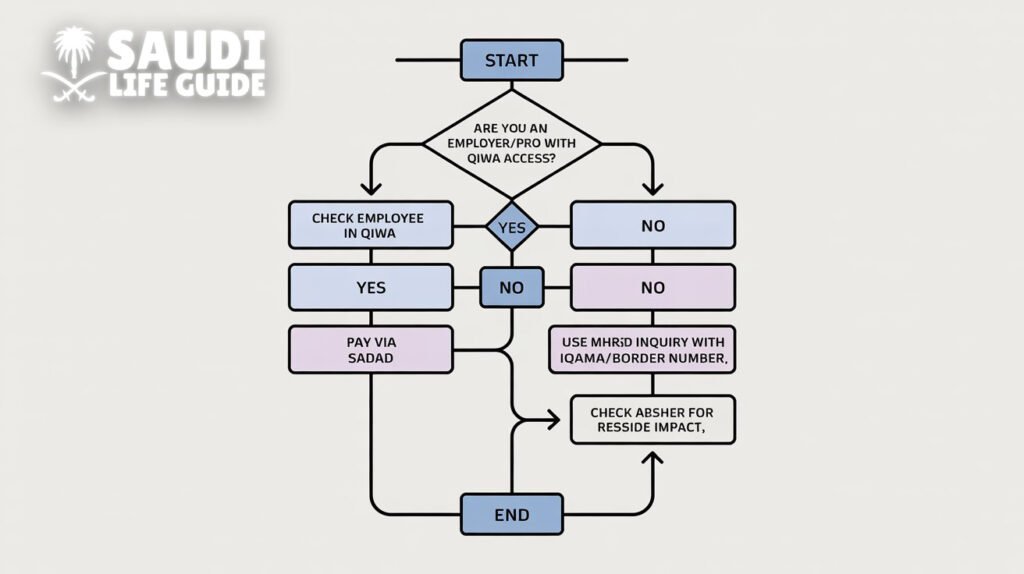
Paying the bill and seeing it reflected on the work permit are two separate steps. A SADAD payment can clear at your bank while the labour system still shows the fee as due for a few hours. If you want to be sure a payment went through, check both sides.
| Where to check | Best for | What you can confirm | Typical requirement |
| Qiwa (Employer) | HR/PRO checking employees at scale | Work permit service status, actions, internal compliance workflow | Qiwa business account access |
| MHRSD e-services inquiry | Quick status check | Work permit details/status shown by the ministry | Iqama/border number |
| SADAD via bank/app | Confirming whether a fee was actually paid | Paid/unpaid, posting status, reference numbers | SADAD invoice/reference |
| Absher | Indirect verification (resident side) | Whether Iqama-related steps reflect updates (not a direct labor-office receipt) | Absher account |
What Your Work Permit Status Means
Exact wording varies by portal, but these are the situations you will see most often.
| What you see | What it usually means | What to do next |
| Fees due / payment required | A bill must be generated/paid before the permit can be issued/renewed | Ask employer/PRO to generate payment, then pay via SADAD (if applicable) |
| Pending / under process | Request exists but not fully completed (may be waiting system sync or action) | Recheck in Qiwa/MHRSD; verify SADAD receipt if payment was made |
| Issued / active / valid | Permit is successfully issued and currently valid | Note expiry date; align next renewal with Iqama cycle |
| Expired | Permit validity ended | Employer must renew; delays can impact Iqama processes |
| No record found | Data mismatch (wrong ID) or service not initiated | Re-enter correct Iqama/border no.; check with employer if request was ever started |
Why Your Payment Status Is Not Updating
- Wrong identifier: confirm whether you should use the iqama number or the border number, and that every digit matches.
- Paid but not posted yet: keep the SADAD receipt and check again later in Qiwa or the MHRSD inquiry. If nothing changes, your employer or PRO can escalate with that proof.
- Employer compliance block: Nitaqat or establishment issues have to be resolved by the employer inside Qiwa before the permit updates.
- Bulk payment allocated wrongly: when an employer pays for several workers at once, match each payment reference to the right employee.
If your bank shows the payment as completed but the portal does not, save the receipt, the SADAD reference number, and the date, time and amount. That is exactly what your employer, PRO or the 19911 helpline will ask for.
Important Deadlines and Penalties 2026
Avoiding penalties requires timely payments. Mark these critical deadlines:
Unpaid fees also affect your establishment record. Read how an iqama status turns red under Nitaqat and what it blocks you from doing.
Work Permit Renewal Timeline
- Ideal time to renew: 90 days before expiry
- Grace period: 30 days after expiry
- Penalty after grace period: SAR 100 per day (maximum SAR 3,000)
Iqama Renewal Consequences
| Days Overdue | Penalty Amount | Additional Actions |
| 1-30 days | SAR 500 | Warning issued |
| 31-60 days | SAR 1,000 | Work permit suspended |
| 61-90 days | SAR 2,000 | Deportation risk |
| 90+ days | SAR 3,000+ | Legal proceedings possible |
Contact Information for Assistance
| Channel | Details |
| Ministry of Labor Hotline | 19911 |
| Absher Support | 920020405 |
| Working Hours | Sunday-Thursday, 8 AM-8 PM |
| Official Website | hrsd.gov.sa |
| Twitter Support | @ABORKER_MOL |
Conclusion
Paying Maktab Amal fees in Saudi Arabia has become increasingly streamlined through digital platforms like Absher and SADAD. By understanding the fee structure, following the correct payment procedures, and meeting deadlines, employers can maintain proper legal status for their domestic workers without complications.
For the latest updates on Maktab Amal services and fee changes, regularly check the official HRSD website or follow their social media channels.
Frequently Asked Questions (FAQs)
Is there a fee for checking Maktab Amal services?
No, checking fees and service status is completely free through all official platforms.
Can someone else pay my worker’s fees?
Yes, any person with the worker’s Iqama number can make the payment through SADAD.
Can I get a refund for Maktab Amal fees?
Refunds are only possible for duplicate payments. Submit a refund request through the Ministry of Labor with proof of payment.
How long does it take for payment to reflect in the system?
Online payments typically reflect within 1-4 hours. Bank transfers may take up to 24 hours.
Can I pay Maktab Amal fees from outside Saudi Arabia?
Yes, using international Visa/Mastercard through Absher, provided your Absher account is active and linked to a valid Saudi phone number.