



Last updated: 16 October 2026
To log in to Qiwa, open sso.qiwa.sa, enter your National ID, Iqama number or e-mail and your password, or click Log in with Nafath. New users click Register now, enter their Iqama number and date of birth, and confirm through Nafath. Qiwa is the Ministry of Human Resources and Social Development’s labor platform, and as an employee you use it to accept your employment contract, approve job transfers and occupation changes, and download an experience certificate.
This guide covers registration, the Qiwa login in English, your contract, transfers, and the errors expats run into most often.
Qiwa at a Glance
| Question | Answer |
|---|---|
| What it is | The labor market platform of the Ministry of Human Resources and Social Development (MHRSD) |
| Website | qiwa.sa (login at sso.qiwa.sa), plus the Qiwa mobile app |
| Log in with | National ID, Iqama or e-mail and password, or Nafath |
| Register with | Iqama or National ID, date of birth, then Nafath on your mobile |
| Main employee services | Employment contracts, employee transfer, occupation change, experience certificate |
| Cost for employees | Free (Qiwa lists employee transfer as free and instant) |
Get Iqama, visa and job updates on WhatsApp
Follow the Saudi Life Guide channel to get new rules, fees and news as soon as we publish them.
Follow on WhatsAppHow to Register a Qiwa Account
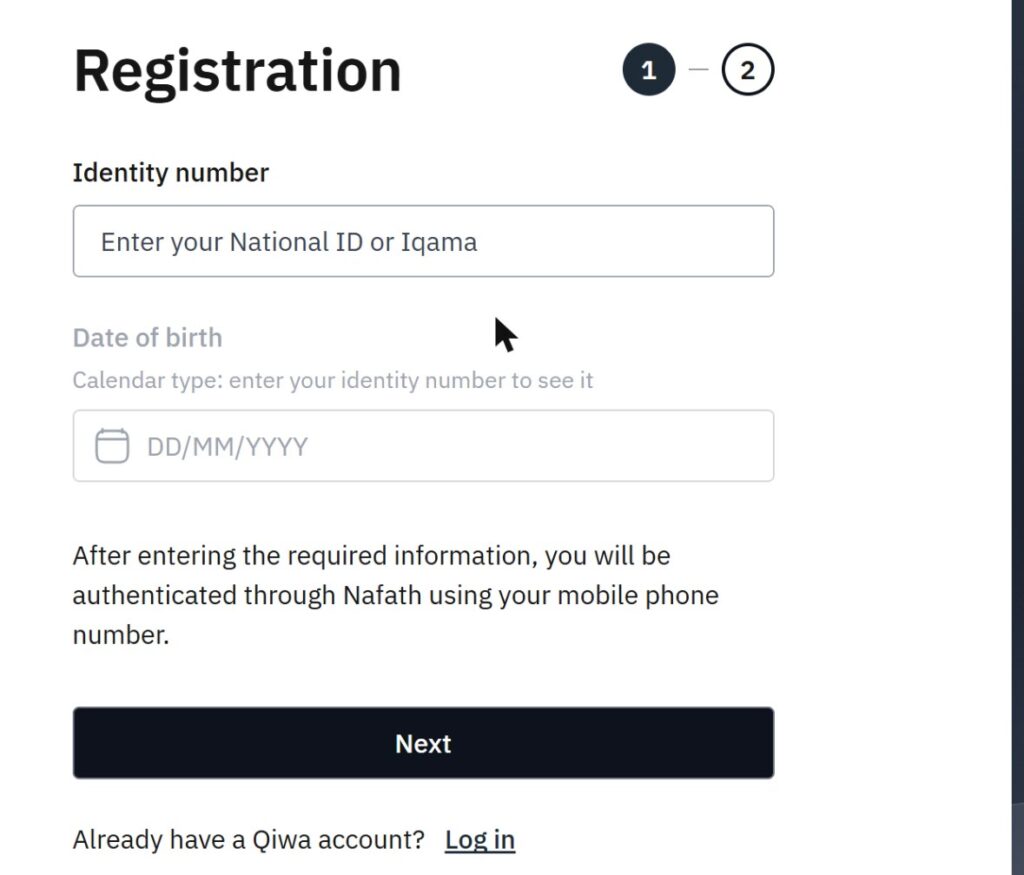
- Open sso.qiwa.sa and click Register now.
- Enter your Iqama number (or National ID for Saudis). The date of birth field then shows which calendar to use.
- Enter your date of birth and click Next.
- Approve the request in the Nafath app. Qiwa authenticates you through Nafath using your mobile number.
- Complete step 2 of the registration, then log in.
Nafath only works if your Absher account is active and your mobile number is registered to your Iqama. If either is missing, fix it first with our guides to Absher registration and registering a mobile number with your Iqama.
Qiwa Login in English
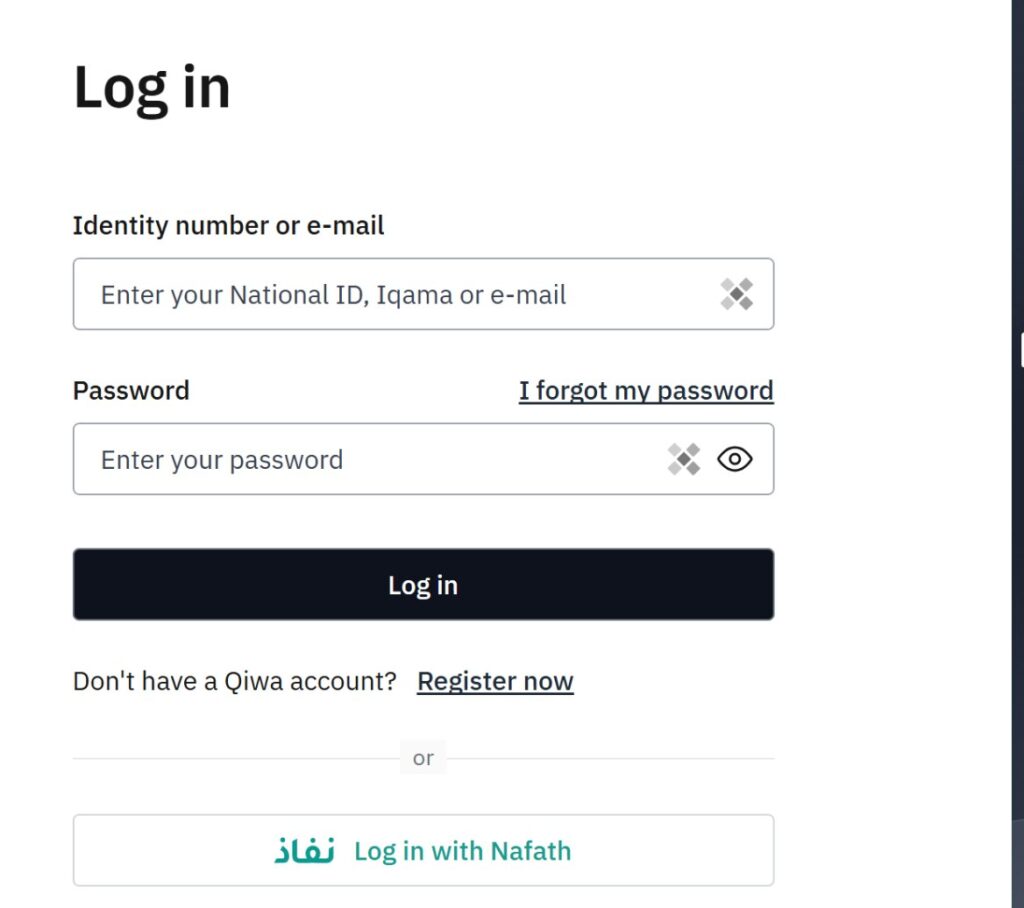
- Go to sso.qiwa.sa and choose EN at the top if the page opens in Arabic.
- Enter your National ID, Iqama number or e-mail under Identity number or e-mail.
- Enter your password and click Log in. Forgot it? Click I forgot my password.
- Or click Log in with Nafath and approve the number shown in the Nafath app.
What You Can Do in Qiwa as an Employee
| Qiwa service | What it does |
|---|---|
| Employment Contracts | View, accept or reject the contract your employer sends, and track current, past and upcoming contracts |
| Employee Transfer | View, accept or reject transfer requests from your current and new employer, and see your transfer history |
| Change Occupation | Accept or reject an occupation change your employer requests |
| Experience Certificate | Issue and download your experience certificate without your employer’s approval |
| Labor law and calculators | Read the labor law chapters and use Qiwa’s tools and calculators |
Your work permit and iqama renewal are handled by your employer. To see whether your company is allowed to renew and transfer workers, check its Nitaqat colour.
How to Check and Accept Your Contract in Qiwa
- Log in to your Qiwa individual account.
- Open Employment Contracts.
- Open the contract your employer sent and read it fully: job title, basic salary, housing and other allowances, start date and duration.
- Accept it if everything matches what you agreed, or reject it and ask your employer to correct it.
Your Qiwa contract is the one that counts. Since 15 April 2026, only contracts documented on Qiwa count toward a company’s Saudization, so employers are now expected to register every contract there. Check that the salary matches what you are paid: the same wage shows on your GOSI salary certificate and is used for your end of service benefit.
How a Job Transfer Works in Qiwa
- Your new employer sends a transfer request for you in Qiwa.
- You open Employee Transfer in your individual account, review the request and the new contract, and accept or reject it.
- The request moves through the remaining approvals, and you can follow its status in your transfer history.
Under the Labor Reform Initiative that started on 14 March 2021, expat workers can move to a new employer when their contract ends without the current employer’s consent, and during the contract under set conditions that include a notice period (HRSD). Qiwa lists the employee transfer service as instant and free for workers. For more detail, see working for another employer, how to check your transfer status and the probation period rules.
Marked absent from work? Workers with an absent-from-work report can still move through Qiwa in some cases: see the latest huroob rules.
Common Qiwa Problems and What to Do
| Problem | What to do |
|---|---|
| Contract not showing | Your employer has not issued it or used a different ID number. Ask HR to confirm your Iqama number and the contract status. |
| Cannot log in or Nafath fails | Check that your Absher account is active and your mobile number is registered to your Iqama, then try again or reset your password. |
| Transfer request stuck | Check which approval is pending in your transfer history and contact that employer. Keep screenshots of each status. |
| Error when changing occupation or ending a contract | Some actions can only be started by the employer, and some occupations have restrictions. Ask the employer to start the request, or ask Qiwa through Contact us. |
| Wrong salary on the contract | Reject the contract and ask your employer to correct it. Do not accept a contract that does not match your offer. |
For help, use the AI Assistant or the Contact us page on qiwa.sa. If your employer will not fix a contract or salary problem, the labour office (Maktab Amal) handles disputes.
Frequently Asked Questions
How do I log in to Qiwa in English?
Open sso.qiwa.sa, choose EN at the top of the page, then enter your National ID, Iqama number or e-mail and your password and click Log in. You can also click Log in with Nafath and approve the request in the Nafath app, which avoids typing a password.
How do I create a Qiwa account as an expat?
Click Register now on the Qiwa login page, enter your Iqama number and date of birth, and click Next. Qiwa then authenticates you through Nafath using your mobile number, so your Absher and Nafath details must be active and your Saudi mobile number registered to your Iqama.
How do I accept my employment contract in Qiwa?
Log in to your Qiwa individual account and open Employment Contracts. Open the contract your employer sent, read every clause, including salary, allowances and duration, and accept or reject it. Accepted contracts and your past and upcoming contracts stay listed there.
How do I accept a transfer request in Qiwa?
Log in and open Employee Transfer. Requests from your current and new employers appear there, and you can view, accept or reject each one and see your transfer history. Qiwa lists the service as instant and free, on the web and in the mobile app.
Why is my contract not showing in Qiwa?
Usually the employer has not issued it yet or issued it to a different identity number. Ask your employer to confirm the Iqama number used and the contract status. Since 15 April 2026 only contracts documented on Qiwa count for Saudization, so employers have a strong reason to fix it.
Is Qiwa the same as GOSI or Absher?
No. Qiwa is the Ministry of Human Resources platform for contracts, transfers, work permits and labor services. GOSI handles social insurance and the wage certificate, and Absher handles iqama, visas and passport services. You use the same Nafath identity to log in to all three.
Leaving Saudi Arabia for good? See the final exit visa guide, and start with our complete iqama guide for everything else.
Sources: Qiwa (qiwa.sa individual services and service pages, sso.qiwa.sa login and registration, read 16 October 2026); Ministry of Human Resources and Social Development, Labor Reform Initiative announcement.