



The GOSI Salary Certificate is one of the most important employment documents in Saudi Arabia. It proves your official salary, employment status, and social insurance contributions. This certificate is issued by the General Organization for Social Insurance (GOSI), the government agency responsible for managing social insurance benefits and employment insurance records across the Kingdom.
What is a GOSI Salary Certificate?
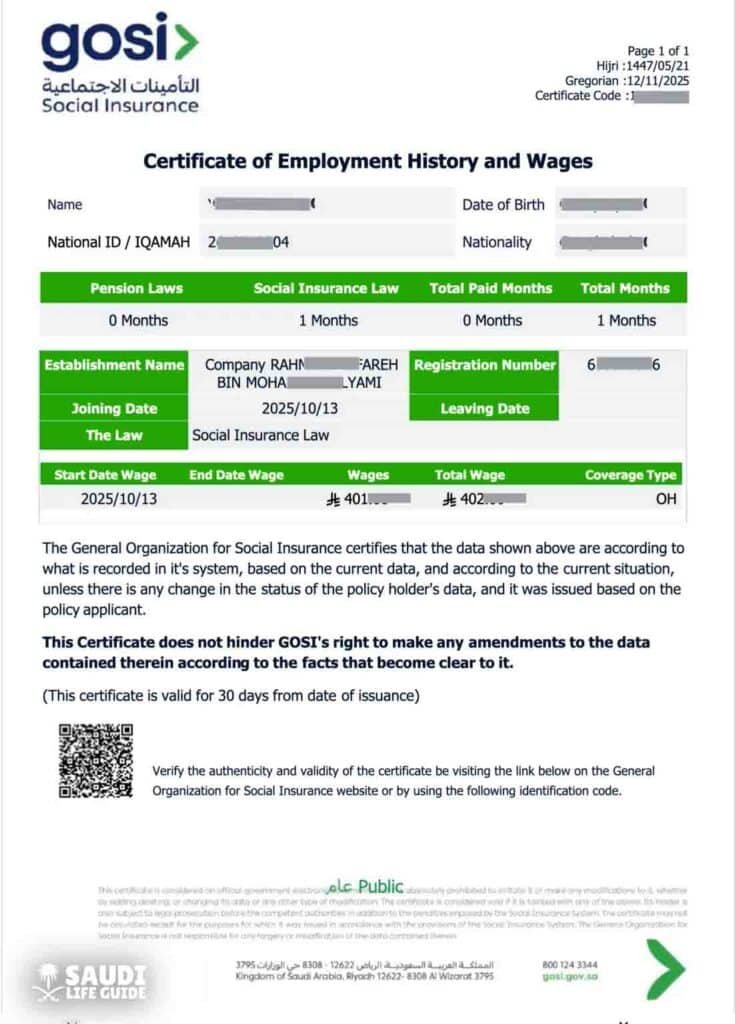
A GOSI salary certificate (also called Wage e-Certificate) is an official electronic document that shows:
• Current salary
• Employment history
• Contribution periods
• Employer information
• Social insurance registration status
GOSI provides this service online so contributors can issue a certificate detailing employment periods and wages subject to insurance coverage.
This certificate acts as proof that your employer has registered you under Saudi Arabia’s social insurance system and that salary records exist in official government databases.
Why the GOSI Salary Certificate is Important
The GOSI certificate is widely required across Saudi Arabia for government, banking, and employment purposes.
Common Uses
| Purpose | Required by |
|---|---|
| Bank loan application | Saudi banks |
| Housing or personal finance | Finance companies |
| Visa applications | Jawazat / MOI |
| Family visa processing | Ministry of Interior |
| Employment verification | Employers |
| Credit card approval | Financial institutions |
| Labor disputes | Ministry of Human Resources |
It is also required when applying for housing loans, government services, or sponsorship transfers.
Who Can Download the GOSI Salary Certificate?
The following individuals are eligible:
Employees (Saudi and Expatriates)
All private sector workers registered in GOSI can download their salary certificate.
Employers and HR Departments
Companies use certificates to verify employment records and salary contributions.
Government Authorities and Financial Institutions
Authorities use GOSI records for verification and eligibility checks.
Methods to Download GOSI Salary Certificate (2026)
You can download the certificate using three official methods:
- GOSI official portal (recommended)
- Taminaty mobile app
- Qiwa platform
Method 1: Download GOSI Salary Certificate via Official Website (Step-by-Step)
This is the most widely used and fastest method.
Step 1: Visit GOSI Portal
Go to the official GOSI website or Taminaty portal: Gosi.Gov
Log in using:
• National ID (Saudis)
• Iqama number (expats)
• Nafath login authentication
Step 2: Open Certificates Section
After login:
Dashboard → Certificates → Wage Certificate
Select:
“Certificate of Employment History and Wages”
Step 3: Generate the Certificate
Click:
Issue Certificate
The system will generate the certificate instantly.
GOSI certificates are usually issued immediately through the portal when records are correct.
Step 4: Download or Print
Click:
Download PDF
or
Print Certificate
The certificate will be saved to your device.
Method 2: Download GOSI Salary Certificate Using Taminaty App
The Taminaty app is the official GOSI mobile application.
Steps:
- Download Taminaty from App Store or Play Store
- Login using Nafath or Absher credentials
- Tap Certificates
- Select Wage e-Certificate
- Generate and download PDF
The app allows instant issuance and offline viewing of certificates.
Method 3: Download Salary Certificate via Qiwa Platform
Qiwa is another Saudi labor platform integrated with GOSI.
Steps:
- Login to Qiwa account
- Go to Services
- Select Salary Certificates
- Download or print
Overview of GOSI Salary Certificate Download Process
| Step | Action |
|---|---|
| Step 1 | Login to GOSI portal |
| Step 2 | Open Certificates section |
| Step 3 | Select Wage Certificate |
| Step 4 | Issue certificate |
| Step 5 | Download PDF |
Processing time: Instant
Cost: Free
What Information Does the GOSI Salary Certificate Include?
The certificate contains the following details:
| Information | Description |
|---|---|
| Employee name | Full name |
| Iqama / National ID | Identification number |
| Employer name | Company name |
| Salary | Basic salary |
| Contribution period | Employment duration |
| Insurance status | Active / inactive |
| Certificate ID | Unique verification number |
GOSI Contribution Rates in Saudi Arabia (2026)
GOSI contributions are calculated based on:
Basic Salary + Housing Allowance
Contribution Table
| Category | Employee Contribution | Employer Contribution | Total |
|---|---|---|---|
| Saudi nationals | 10% | 12% | 22% |
| Expatriates | 0% | 2% | 2% |
Expatriates only receive occupational hazard insurance coverage.
Real Workforce Statistics (Saudi Arabia)
GOSI covers a massive portion of Saudi Arabia’s workforce:
| Establishment Type | Registered Workers |
|---|---|
| Micro establishments | 498,000 |
| Small establishments | 48,000 |
| Medium establishments | 8,000 |
This demonstrates the scale of GOSI as the official employment insurance system in Saudi Arabia.
Chart: GOSI Contribution Breakdown
Saudi Nationals:
Employee Contribution: 10%
Employer Contribution: 12%
Expatriates:
Employer Contribution: 2%
Employee Contribution: 0%
This ensures social insurance protection while minimizing employee deductions for expatriates.
Benefits of Having a GOSI Salary Certificate
Financial Benefits
• Easier loan approval
• Faster credit card processing
• Housing finance eligibility
Legal Benefits
• Proof of employment
• Labor dispute support
Immigration Benefits
• Family visa approval
• Residency services
Government Benefits
• Access to public services
• Insurance and compensation eligibility
Troubleshooting Common Problems
Problem 1: Certificate Not Showing
Cause: Employer did not register employee
Solution: Contact HR
Problem 2: Login Error
Cause: Incorrect credentials
Solution: Reset password via Nafath
Problem 3: Wrong Salary Information
Cause: Incorrect employer reporting
Solution: Request employer update
Problem 4: Portal Not Working
Cause: Maintenance or system downtime
Solution: Try later or use Taminaty app
How to Verify GOSI Salary Certificate
Visit official verification page:
Enter:
• Certificate number
• National ID / Iqama
The system will verify authenticity.
Comparison: GOSI vs Salary Certificate vs Employment Certificate
| Feature | GOSI Certificate | Salary Certificate | Employment Certificate |
|---|---|---|---|
| Issued by | Government | Employer | Employer |
| Official status | Highest | Medium | Medium |
| Accepted by banks | Yes | Yes | Limited |
| Used for visas | Yes | Sometimes | Sometimes |
| Verification possible | Yes | No | No |
GOSI Portal vs Taminaty vs Qiwa (Comparison Table)
| Platform | Best for | Availability |
|---|---|---|
| GOSI Portal | Full certificate services | Web |
| Taminaty App | Mobile users | iOS / Android |
| Qiwa Platform | Employment contracts | Web |
Processing Time and Fees
| Item | Details |
|---|---|
| Processing time | Instant |
| Fees | Free |
| Download format | |
| Validity | Depends on purpose |
GOSI certificates are issued electronically and instantly when records are available.
Conclusion
Downloading your GOSI Salary Certificate in Saudi Arabia is fast, free, and fully digital in 2026. The certificate is issued by GOSI, the official government social insurance authority, and acts as the most reliable proof of employment, salary, and insurance status.
With just a few clicks on the GOSI portal, Taminaty app, or Qiwa platform, you can instantly download your certificate in PDF format. This document is essential for banking, visa applications, employment verification, and government services.
As Saudi Arabia continues expanding digital government services under Vision 2030, accessing employment records like the GOSI salary certificate has become easier, faster, and more secure than ever.
Frequently Asked Questions (FAQs)
Can I download it without employer permission?
Yes, if registered in GOSI system.
Is GOSI certificate required for loans?
Yes. Most Saudi banks require it.
How long does it take to download?
Usually less than 2 minutes.
Is the GOSI salary certificate free?
Yes, it is completely free.
Can expatriates download GOSI salary certificate?
Yes. All expats registered in GOSI can download their certificate.
