



Last updated: 8 November 2026
Najiz has no full English version: the najiz.sa portal and the Najiz app both open in Arabic. This Najiz English guide fixes that. You log in with Nafath using your iqama number, then the judicial file on the home screen shows your court cases (Judiciary) and enforcement requests (Enforcement), and the Services tab holds power of attorney, verification and appointment services.
Below, each Arabic label has its English meaning next to it, so you can check a case, attend a hearing online, follow enforcement or issue a power of attorney. This is general information, not legal advice; for a real dispute, speak to a licensed Saudi lawyer.
Najiz English quick answer
| What you want to do | Where in Najiz | Login needed? |
|---|---|---|
| Log in | Login through National Nafath (تسجيل الدخول عبر نفاذ الوطني) | Nafath app |
| Check a court case | Home > Judicial file (الملف العدلي) > Judiciary (القضاء) | Yes |
| Check enforcement against you or filed by you | Home > Judicial file > Enforcement (التنفيذ) | Yes |
| Join a hearing by video | Attending sessions (حضور الجلسات) | Yes |
| Issue a power of attorney | Services > Powers of attorney (الوكالات) | Yes |
| Verify a power of attorney | Services > Verification services (خدمات التحقق) | Can be used without logging in |
| Help | Judicial Communication Centre 1950 (from abroad +966 920001950) | No |
Follow Saudi Life Guide for Iqama, visa and job updates
New rules, fees and news as soon as we publish them. Join 95,500+ followers on Facebook.
Is there a Najiz English version?
Not in practice. The App Store listing shows English as a language, but when we opened the Najiz app on 8 November 2026 every screen was in Arabic, and the najiz.sa home page has no English switch, only display and sign-language options.
What does exist in English is the Ministry of Justice service guide on moj.gov.sa/English, with a page for each Najiz service. Use the label tables below to find the button, and the Ministry’s English page to read the rules.
How to log in to Najiz with Nafath
Najiz uses the National Single Sign-On, which means Nafath. If Nafath is not set up yet, follow our Nafath app guide first.
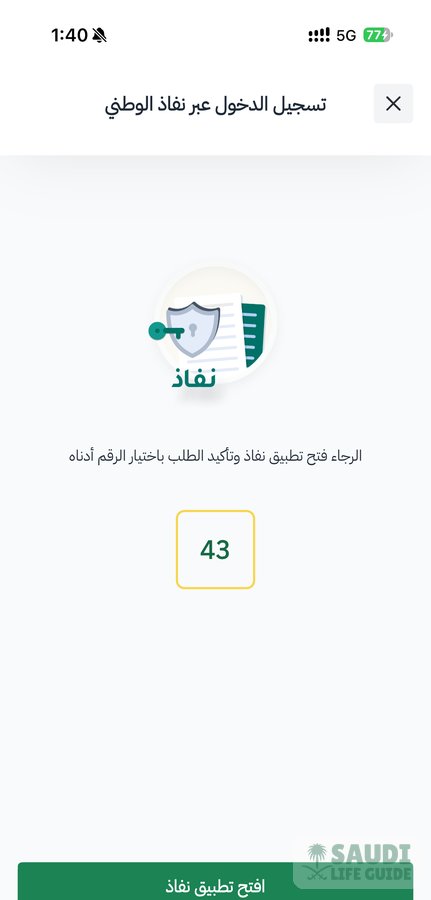
- Open the Najiz app (or najiz.sa) and tap Login through National Nafath (تسجيل الدخول عبر نفاذ الوطني).
- Enter your iqama number.
- Najiz shows a number on the screen. Open the Nafath app, open the new request and choose the same number.
- Confirm with your face or fingerprint in Nafath. Najiz opens your home screen.
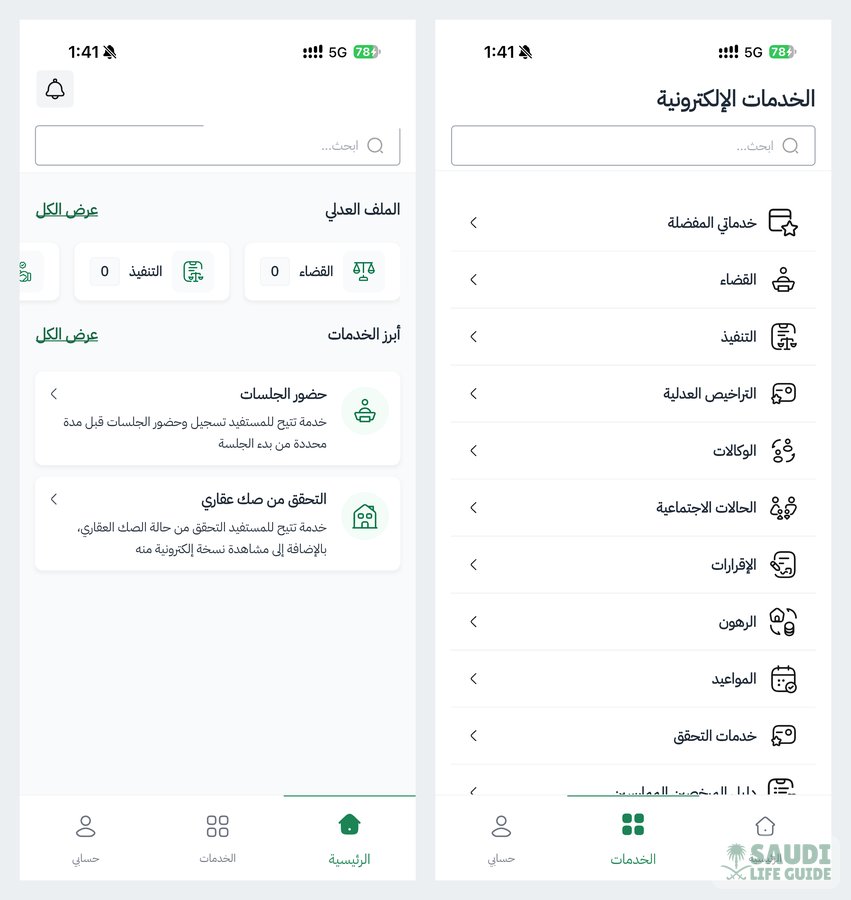
Najiz English labels: home screen and Services tab
After login, the home screen shows your account type, Individual account (حساب فرد), a search bar, and your Judicial file (الملف العدلي). The judicial file has two counters: Judiciary (القضاء) for court cases and Enforcement (التنفيذ) for enforcement requests. Two featured services sit below it: Attending sessions (حضور الجلسات) and Real estate deed verification (التحقق من صك عقاري).
The Services tab, Electronic services (الخدمات الإلكترونية), groups everything else:
| English meaning | Arabic label | What expats use it for |
|---|---|---|
| My favourite services | خدماتي المفضلة | Shortcuts you save |
| Judiciary | القضاء | Court cases, statements of claim, online pleading |
| Enforcement | التنفيذ | Enforcement requests, filed by you or against you |
| Judicial licences | التراخيص العدلية | Licences for lawyers and other legal professions |
| Power of attorney | الوكالات | Issue, view or cancel a power of attorney |
| Social cases | الحالات الاجتماعية | Family matters |
| Acknowledgements | الإقرارات | Formal written declarations |
| Mortgages | الرهون | Property mortgages |
| Appointments | المواعيد | Booking an in-person visit |
| Verification services | خدمات التحقق | Checking a power of attorney, judgment or deed |
| Directory of practitioners | (last item in the list) | Finding a licensed lawyer |
How to check your Najiz case status
- Log in with Nafath.
- On the home screen, tap Judiciary (القضاء) inside the Judicial file (الملف العدلي). The number on it shows how many court records are linked to your ID.
- Open the case to see its court, status and hearing date. Requests for that case, such as an appeal, are made from inside it.
- For enforcement, tap Enforcement (التنفيذ) instead. The Ministry’s Inquire About Enforcement Applications service lists every enforcement request where you are the applicant or the debtor.
Hearing times are also sent by SMS. If the court opens online pleading for your case, the e-Litigation service lets you read the other side’s submissions and reply to the judge’s questions within the time the court sets.
Attending a hearing online
Saudi courts hold many hearings by video. The court sends an SMS with the hearing time. You then log in to Najiz, open the case and register your remote attendance through Attending sessions (حضور الجلسات), which is one of the two featured services on the home screen. The video link is given only after you register. Register a little before the start time and join from a quiet place with your iqama to hand.
Labour cases: from Friendly Settlement to the labour court
An employee does not start a labour claim on Najiz. The first step is the free HRSD Friendly Settlement service, filed online with the settlement office of the city where you last worked, within 12 months. Our guide to Maktab Amal (the labour office) covers the offices and the 19911 helpline.
- File the Friendly Settlement claim with your contract or other proof of the job.
- You and the employer get one week to negotiate, then settlement sessions follow.
- If there is no agreement, HRSD refers the case to the labour court within 21 working days.
- From then on, the case appears under Judiciary (القضاء) in your Najiz judicial file, with hearing dates and any online sessions.
For unpaid wages, read what to do after 1, 2 or 3 months of salary delay. If you left because the employer broke the contract, our guide to resigning under Article 81 explains the claim, and the end of service benefit calculator gives you the figure to claim.
Enforcement on Najiz
If a request is filed against you: check Enforcement (التنفيذ) on the home screen and read the notice. Under the Enforcement Law, a debtor who does not pay or disclose assets within five working days of notification can face a bank freeze, a travel ban and suspended services. Our guide to the Saudi Enforcement Law explains the travel ban limits and what to do, and Saudi bank account frozen explains why renewing your iqama will not lift a court freeze.
If someone owes you money: the File an enforcement application service, under Enforcement (التنفيذ) in the Services tab, takes the application online. You need a completed Najiz profile, an active IBAN linked to your ID, the debtor’s ID details and the enforcement document, with an Arabic translation if it is in another language. A unified Ejar lease counts as an enforceable document, so unpaid rent can go straight to enforcement; see our Ejar guide for tenants.
Najiz power of attorney for expats
An electronic power of attorney (wakala) lets someone act for you, for example to follow a labour case after final exit. Residents with a valid iqama, aged 18 or over, can issue one on Najiz without visiting a notary.
- Log in and open Services > Power of attorney (الوكالات).
- Choose Issue power of attorney and start a new application.
- Enter the details of the principal (you) and the agent or agents.
- Select the terms (the powers you give) and the duration, then approve.
- You get an SMS when it is issued. Nothing is printed, stamped or signed.
The rules that matter most for expats:
| Rule | What it means for you |
|---|---|
| Maximum duration | One year |
| Expired iqama | The power of attorney is limited to claims and courts matters |
| Agents for a resident | A resident may appoint a Saudi or a resident agent |
| Court matters | On a multi-principal power of attorney, a claims and courts agent must be a licensed lawyer or a relative up to the fourth degree |
| Labour settlement | HRSD needs a Ministry of Justice power of attorney that covers attending settlement and settling or waiving claims |
| Age 65 or over, first time | Issue through the Virtual Notary or a private notary; later ones can be done on Najiz |
| Cancelling | Any party can withdraw at any time on Najiz; it ends automatically on the death of a party |
| Fee | The Ministry’s service page lists no fee |
How to verify a power of attorney
Open Verification services (خدمات التحقق), choose Verify power of attorney, enter its number and the ID number of one party, and tap Verify to see its status and clauses. It also works without logging in, with your ID number and a code sent to your Absher mobile number. The same section verifies judgments and real estate deeds.
What you need: documents and fees
| Service | What you need | Fee on the Ministry’s page |
|---|---|---|
| File statement of claim | Valid iqama, national address, defendant’s ID number, documents for the case type | Not listed; check in the service |
| File an enforcement application | Najiz profile, IBAN linked to your ID, enforcement document (Arabic translation if needed) | None listed |
| Issue power of attorney | Valid iqama, agent’s details | None listed |
| Verify power of attorney | Power of attorney number, one party’s ID, Absher mobile | None listed |
To file a statement of claim you need a national address; if yours is missing, register your national address first.
Common problems and fixes
- No Nafath request arrives: reopen the Nafath app, check your connection and try the login again.
- My labour case is not in Najiz: it only appears after HRSD refers it to the labour court. Until then, follow it on the HRSD portal.
- Power of attorney rejected for an expired iqama: with an expired iqama it is limited to claims and courts. Renew the iqama first for anything else.
- Something does not work: call the Judicial Communication Centre on 1950 (from abroad +966 920001950) or email 1950@moj.gov.sa.
Tips from real expat experience
- Based on real expat experience in KSA, the judicial file counters are the fastest check. Look at Judiciary and Enforcement before a final exit or a long trip, along with the travel ban check on Absher.
- Keep the Najiz app installed even with no case: notices arrive electronically, and the enforcement deadline runs from notification.
- If you are leaving the Kingdom with a labour claim open, set up the power of attorney while your iqama is still valid.
Frequently asked questions
Can I use Najiz in English?
Not fully. The najiz.sa portal and the Najiz app show Arabic screens. The Ministry of Justice publishes English guides for each service on moj.gov.sa/English, and the tables in this Najiz English guide translate each button.
How do I check my case status on Najiz?
Log in with Nafath, tap Judiciary (القضاء) in the Judicial file (الملف العدلي) on the home screen and open the case to see the court, the status and the hearing date.
Can an expat issue a power of attorney on Najiz?
Yes. A resident with a valid iqama, aged 18 or over, can issue an electronic power of attorney under Power of attorney (الوكالات) without visiting a notary. It lasts up to one year and can be withdrawn at any time.
How do I know if there is an enforcement case against me?
Log in to Najiz and check Enforcement (التنفيذ) in your judicial file, or use the Inquire About Enforcement Applications service. Act within five working days of a notice, and get advice from a licensed lawyer if you dispute the debt.
What is the Najiz customer service number?
The Ministry of Justice Judicial Communication Centre is 1950 inside Saudi Arabia and +966 920001950 from abroad. The email is 1950@moj.gov.sa.
This guide is general information, not legal advice. For a specific case, speak to a licensed Saudi lawyer; you can find one in the Directory of practitioners in the Najiz Services tab.
Sources: Ministry of Justice service pages (Issue Power of Attorney, Multi-principal power of attorney, Verify power of attorney, File an enforcement application, Inquire About Enforcement Applications, File statement of claim, e-Litigation); HRSD Friendly Settlement for Labor Disputes; najiz.sa; Najiz app screenshots by Saudi Life Guide, 8 November 2026.