
Last updated: 15 November 2026
SADAD payment is how almost every bill and government fee in Saudi Arabia gets paid: your electricity and water bill, your Ejar rent, your iqama renewal, your exit re-entry visa and your traffic fines. SADAD is the national bill payment system owned by the Saudi Central Bank (SAMA). You do not open a separate SADAD account or download a SADAD app; you pay through the bank app you already use, by choosing the company or government body (the biller) and entering your bill or account number.
Below: the difference between a biller number and a bill number, how to pay in Al Rajhi, SNB, Riyad Bank and other apps, how Absher and Jawazat fees work, how to check a payment, and what to do when the app says “no bills found”.
What Is the SADAD Payment System?
SAMA describes SADAD as “one of the national payment systems owned by the Saudi Central Bank”, launched in 2004. It sits between the billers (the bodies that issue invoices, such as government agencies, utility companies and landlords’ platforms) and the banks and licensed digital wallets where people pay. When a biller issues an invoice, it appears in SADAD; when you pay it in your bank app, the biller is told straight away and its system updates.
According to SAMA’s SADAD page, you can view and pay SADAD bills through ATMs, internet banking, phone banking, banking apps and licensed digital wallets, and the system also handles refunds for invoices paid through it.
Not to be confused with SADAD in Bahrain. If you search “SADAD payment”, you will also see SADAD Bahrain, a separate private company that runs payment kiosks there. It has nothing to do with the Saudi system. If you live in Saudi Arabia, everything you need is inside your Saudi bank app.
Follow Saudi Life Guide for Iqama, visa and job updates
New rules, fees and news as soon as we publish them. Join 108,000+ followers on Facebook.
Biller Number vs Bill Number: The Two Numbers You Need
Many expats in Saudi Arabia face the same confusion: both numbers get called “SADAD number”, but they are different.
| Number | What it identifies | Where you find it | Example |
|---|---|---|---|
| Biller number (biller code) | The company or government body you are paying. Same for everyone. | Usually you just pick the biller by name in the app | Ejar rent: biller 153 |
| Bill number (subscription, account or invoice number) | Your own bill or account with that biller | On the bill, the invoice page or the SMS from the biller | Your electricity account number, your Ejar invoice number |
| Iqama or border number | You, for government payments that have no bill number | Your iqama card or Absher | Traffic fines, Jawazat fees |
SAIB puts it simply on its SADAD page: each biller has a unique code, and each transaction has its own reference number. When a government portal such as the MOFA attestation site says “pay through SADAD”, the invoice page gives you both: the biller (often shown by name) and a bill or invoice number.
SADAD Biller Codes for Common Bills
Modern bank apps rarely ask for a code; you choose the biller from a list. The codes below are the ones that come up most often. Where your app shows a different name, pick by name.
| Bill | Biller in the app | Code | What you enter |
|---|---|---|---|
| Rent on new residential Ejar contracts | Ejar / Rent | 153 (REGA) | The Ejar invoice number |
| Electricity | Saudi Energy (formerly Saudi Electricity Company) | Commonly listed as 002 | Your electricity account number |
| Water | National Water Company | Pick by name | Your water account number |
| Iqama, exit re-entry, other Jawazat fees | Government payments, Ministry of Interior / Passports | No code needed | Iqama or border number, then the service |
| Traffic fines | Government payments, Traffic violations | No code needed | Iqama or ID number |
For the bill-specific steps, see our guides to checking and paying the Saudi electricity bill, checking your water bill and paying rent through Ejar.
How to Make a SADAD Payment in Your Bank App
Every Saudi bank offers SADAD, and the flow is the same everywhere even though the menu names differ. Al Rajhi, SNB (AlAhli), Riyad Bank, SAB, ANB, Alinma and the others all put it under Payments or Bills.
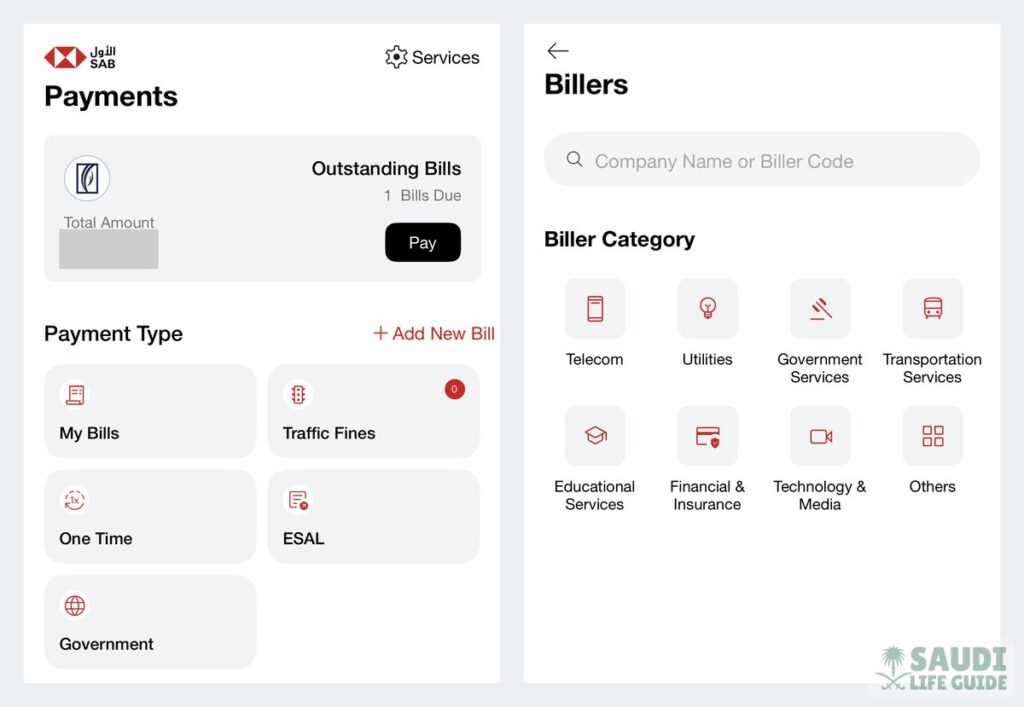
- Open Payments. Look for “Bills”, “SADAD”, “Pay bills” or “SADAD payments”.
- Choose how to pay. “Add biller” (or “Add new bill”) saves the bill so it appears every month. “One-time payment” pays it once without saving. Use Add biller for electricity, water and phone; use one-time payment for a single government invoice.
- Pick the category and biller. For example Utilities, then Saudi Energy; or Government, then the ministry named on your invoice.
- Enter your bill or account number and a nickname if the app asks (for example “Flat electricity”).
- Check the amount and the name the app brings back from the biller, then confirm with the OTP.
- Save the receipt. Take a screenshot or download it; it carries the SADAD reference you need if anything goes wrong.
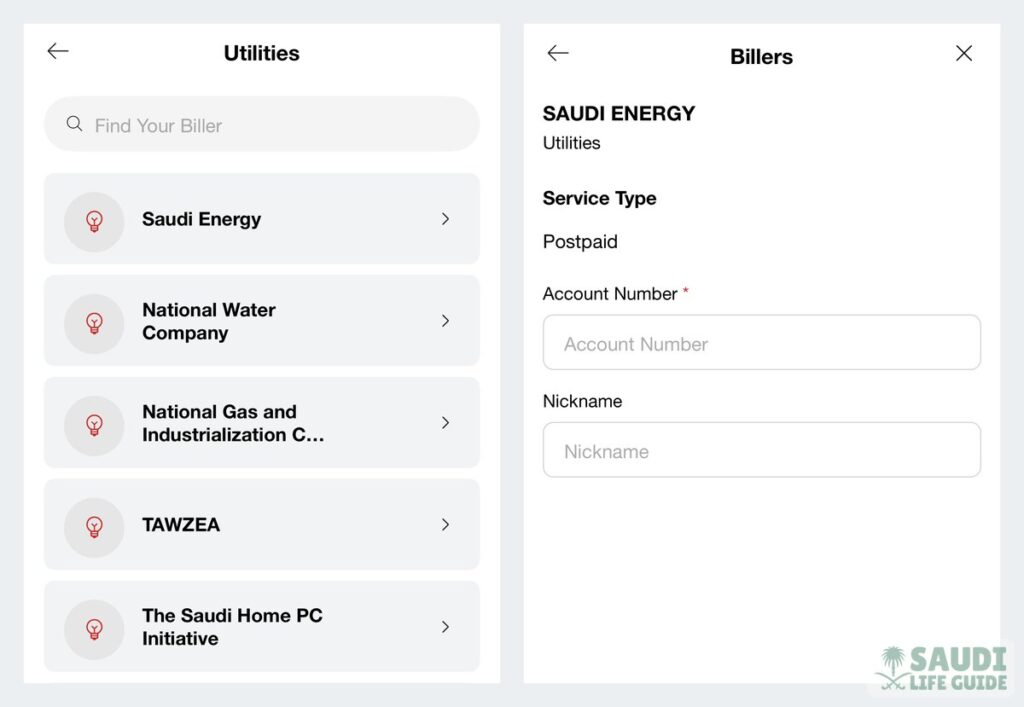
Based on real expat experience in KSA, the step that saves the most time is “Add biller”: once your electricity and water accounts are saved, the app shows the new amount each month and you pay with two taps. If you are still choosing a bank, our comparison of the best banks in Saudi Arabia for expats covers the apps.
Government Fees Through SADAD: Absher, Iqama, Exit Re-Entry and Fines
In Saudi Arabia, this works differently from a normal bill. For most Jawazat services there is no invoice with a bill number. You pay the fee first through your bank’s government payments (still SADAD), and then you issue the service on Absher. Jawazat customer service has told residents that its fees “are paid through the government payments system at Saudi banks” and that services such as extending an exit re-entry visa can be done on Absher or Muqeem “after paying the fees through SADAD” (Ajel, 2 September 2023).
Paying Jawazat (Passports) Fees
- In the bank app go to Payments, then Government payments (some apps say MOI payments or SADAD government).
- Choose Ministry of Interior, then Passports (Jawazat).
- Choose the service, for example iqama renewal, exit re-entry visa or the dependents fee.
- Enter the iqama number (or the border number for a newborn or a new arrival) and the period, check the amount and pay.
- Go back to Absher (or your employer goes to Muqeem or Absher Business) and issue the service. The paid amount is used for it.
Fees differ by service, so check the amount before you pay: see iqama renewal fees for 1 year, exit re-entry visa fees and rules, or work out the total with our iqama fees calculator. The work permit fee (Maktab Amal) is a separate payment to the Ministry of Human Resources; our guide on how to check and pay the Maktab Amal fee explains its SADAD number and payment status.
Paying Traffic Fines and Other Government Violations
Traffic fines are paid the same way: Government payments, Traffic violations, then your iqama number. The Ministry of Finance’s Efaa platform also lets citizens, residents and visitors see every violation registered against them by government bodies and pay “using the SADAD system or a Mada/credit card”; the service is free (Ministry of Finance). For the fine amounts and the discount rules, see our Saudi traffic fine list; companies can now ask for some fines in instalments, covered in government fines in installments.
Other Government Invoices With a Bill Number
Some portals do issue a proper SADAD invoice. MOFA attestation is a good example: after you submit the request, you must pay SAR 30 through SADAD within 3 hours or the appointment is cancelled (see our MOFA attestation guide). In each case, use one-time payment, pick the body named on the invoice, and enter the invoice number exactly.
Paying Electricity, Water and Rent by SADAD
For electricity, choose Utilities, then Saudi Energy (the new name of the Saudi Electricity Company, so the old name is often missing) and enter your account number; our Saudi electricity bill calculator shows roughly what the next bill will be. For water, choose National Water Company and enter the account number from the bill. For rent, REGA has required new residential contracts since 15 January 2024 to be paid only through Ejar’s digital channels, mada or SADAD with number 153; rent paid any other way is not accepted as proof of payment. Commercial contracts are not covered.
How to Check SADAD Payment Status
SAMA says SADAD updates the status of invoices paid through it and sends payment notifications to the biller automatically. So there are two places to check:
- Your bank: open the payment history or the saved biller. A successful payment shows as paid with a SADAD reference number.
- The biller: the bill shows zero due (electricity, water, Ejar), the MOFA request moves to the next step, or Absher lets you issue the service you paid for.
SADAD payments update the biller in real time, so most show within minutes. If the bank shows paid but the biller does not, wait a few hours before paying again: paying twice is far harder to undo than waiting. For iqama and work permit payment status in particular, follow the checks in our Maktab Amal fee guide.
Common SADAD Payment Errors and Fixes
| What you see | Likely reason | What to do |
|---|---|---|
| No bills found / no amount due | The bill is not issued yet, it is already paid, or you picked the wrong biller | Check the biller name on the invoice; wait until the portal confirms the invoice exists |
| Invalid bill or subscription number | A digit is missing, or you entered an iqama number where an account number is needed | Copy the number from the bill or invoice page; do not type it from memory |
| Government payment shows a different amount | Wrong service or period selected, or other dues are added | Go back and choose the exact service and duration you will issue in Absher |
| Paid, but Absher still asks for payment | The update has not reached the ministry yet, or you paid for a different service | Wait, then check your receipt matches the service; contact the bank with the SADAD reference |
| MOFA or another invoice expired | The payment window passed (MOFA: 3 hours) | Create a new request; do not pay an expired invoice |
SADAD Fees and Refunds
Fees. You pay the amount the biller sets. ANB, for example, lists SADAD bill payment as a “free service” on its SADAD page. If you ever see an extra charge, check your own bank’s published tariff before blaming SADAD.
Refunds. SADAD itself supports refunds of invoices paid through it, but the decision belongs to the biller, not to your bank. Three things to know:
- Exit re-entry visa fees are not refunded if the visa is cancelled, Jawazat confirmed in June 2025 (Gulf News).
- Money paid to a government body but not yet used for a service: ask your bank first with the SADAD reference, then the ministry concerned. Keep the receipt.
- Ejar refunds (for example after a contract ends) go to your Ejar wallet, and you withdraw them to your IBAN with an OTP.
Pay Safely
Before you confirm, read the biller name the app shows: if an “agent” sends you a SADAD number, that name tells you who really gets the money. Never share the OTP. If a company asks you to pay a fee the law puts on the employer, such as an Ajeer permit, ask for the SADAD invoice in the company’s name (see our Ajeer paper guide).
SADAD Payment: Frequently Asked Questions
What is SADAD payment in Saudi Arabia?
SADAD is the national bill payment system owned by the Saudi Central Bank (SAMA). It lets you pay utility bills, rent, government fees and fines through any Saudi bank app, internet banking, ATM or licensed digital wallet.
What is the difference between a SADAD biller number and a bill number?
The biller number identifies the company or government body you pay, for example 153 for Ejar rent. The bill number (also called subscription, account or invoice number) identifies your own bill with that biller.
How do I pay iqama renewal through SADAD?
In your bank app go to Government payments, choose Ministry of Interior and Passports, pick iqama renewal, enter the iqama number and period, and pay. The renewal is then issued on Absher, Muqeem or Absher Business.
Can I get a refund of a SADAD payment?
SADAD supports refunds, but the biller decides. Exit re-entry visa fees are not refunded if the visa is cancelled. For other cases, contact your bank with the SADAD reference and then the biller.
Is SADAD Saudi Arabia the same as SADAD Bahrain?
No. SADAD Bahrain is a separate company that runs payment kiosks in Bahrain. Saudi SADAD is SAMA’s national bill payment system, used through Saudi banks.
Sources: Saudi Central Bank (SAMA), SADAD page; Ministry of Finance, Efaa violations service; Real Estate General Authority (REGA), rent payment announcement of 2 January 2024; Arab National Bank and Saudi Investment Bank SADAD pages; Ejar FAQs; Jawazat statements reported by Ajel (2 September 2023) and Gulf News (14 June 2025).