


Last updated: 24 October 2026
To check your Saudi electricity bill without registration, open se.com.sa View and Pay Bill, enter your electricity account number (or the ID or iqama number the meter is registered to) and tap Proceed. You can pay on the same page, in the Saudi Energy app or through any bank app via SADAD. Home electricity costs 18 halalas per kWh up to 6,000 kWh a month, plus a small meter fee and 15% VAT. The Saudi Electricity Company now trades as Saudi Energy, and its Alkahraba app is now the Saudi Energy app.
| Way to check | What you need | Login? |
|---|---|---|
| se.com.sa View and Pay Bill | Account number, or ID/iqama of the registered user | No |
| WhatsApp +966 920001100 | Account number | No |
| Bank app (SADAD) | Account number | Bank login |
| Saudi Energy app or website account | All your accounts, history and graphs | Yes |
Saudi Electricity Bill Check Online Without Registration
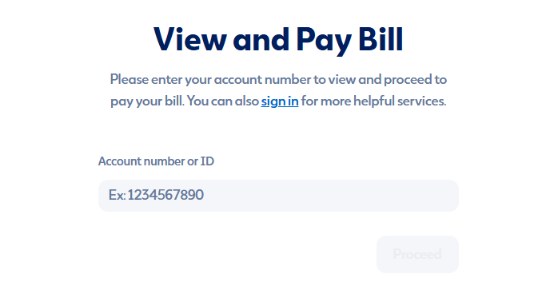
- Open se.com.sa/en/GuestViewBill, or on the homepage choose Most used services, View and Pay Bill.
- In Account number or ID, type the account number from your bill, or the ID or iqama number of the person the meter is registered to.
- Tap Proceed. The amount due appears and you can pay by card on the same page.
WhatsApp: Saudi Energy’s official WhatsApp is +966 920001100. Send “Hi”, choose bills, and send your account number to see the amount due.
Follow Saudi Life Guide for Iqama, visa and job updates
New rules, fees and news as soon as we publish them. Join 107,000+ followers on Facebook.
Check by Meter Number or Account Number: Which One?
Online checks use the account number, not the meter number. Both are printed on your bill:
- Account number: in the Invoice Summary at the top of the bill. It is the number you use to pay. Accounts declared by the actual user start with 300.
- Meter number: in the Technical Data of the Meter section, along with the subscription number and the start and end readings. You need it for Ejar and for meter complaints.
Lost the bill? Ask your landlord, or call Saudi Energy on 933 (24/7) for help finding your account number.
How to Pay the Electricity Bill
- Bank app (SADAD): pick Saudi Energy under Utilities and enter your account number (steps below). Partial payments are accepted.
- Saudi Energy app: pay with mada, credit card or Apple Pay. You can also pay with stc Qitaf points (10 points = SAR 1 for homes) or Al Rajhi Mokafaa points inside the app. Saudi Energy sends an SMS when the bill is issued, with a link to the app, and another when your payment is received.
- Website: pay by card on the View and Pay Bill page after checking the amount.
Pay Through Your Bank App (SADAD)
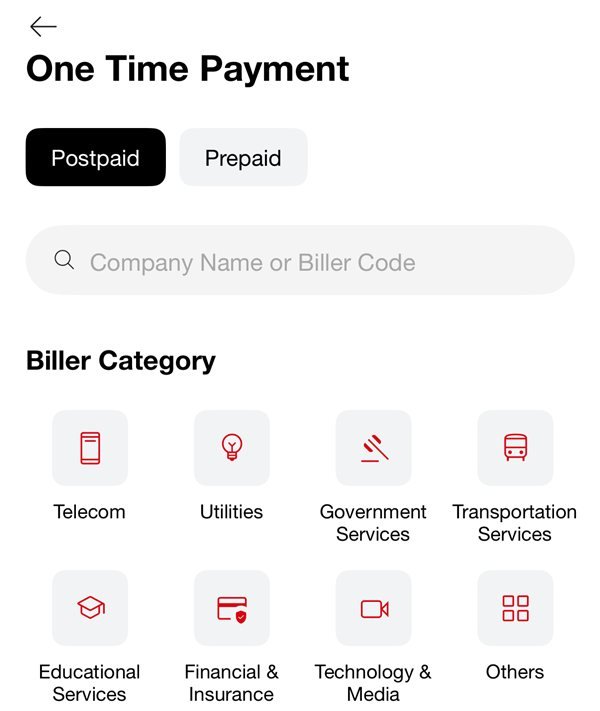
- Log in to your bank app and open SADAD or Bill payments (some apps call it One Time Payment or Add Biller).
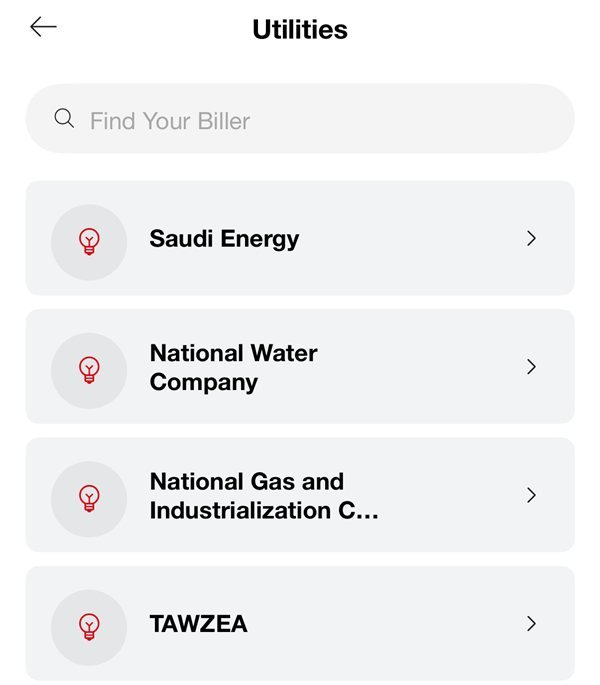
- Choose Utilities (some banks call it Telecom & Utilities).
- Choose Saudi Energy. This is the new name of the Saudi Electricity Company, so you will not find the old name in most apps.
- Enter your electricity account number, check the amount due and pay.
If your bank asks for a biller code, Saudi Energy is listed as 002; many apps don’t show the code and you just pick Saudi Energy by name.
The bill is due on the 28th of the Gregorian month after it is issued. Under the regulator’s rules updated in June 2025, the supply can only be cut after 3 consecutive unpaid months or more than SAR 1,000 in arrears, not earlier than 60 days from the bill date and only after notices. If the power is cut wrongly, Saudi Energy must pay SAR 500 compensation, and it must reconnect within 2 hours of payment. Choosing a bank? See our best banks for expats.
Electricity Tariff in Saudi Arabia (Price per kWh)
New prices from January 2027: the rate rises to 21 halalas per kWh with a fixed monthly charge. See your new bill with our Saudi electricity bill calculator.
| Category | Up to 6,000 kWh a month | Above 6,000 kWh |
|---|---|---|
| Residential (homes) | 18 halalas per kWh | 30 halalas per kWh |
| Commercial (shops, offices) | 22 halalas per kWh | 32 halalas per kWh |
A monthly meter reading, maintenance and billing fee is added: SAR 10 for breakers of 20 to under 100 A, SAR 15 for 100 to under 200 A, rising to SAR 30 above 400 A. VAT of 15% applies to the consumption and the fee. Tariffs are set by the Saudi Electricity Regulatory Authority (SERA). These rates change on 1 January 2027: see the Saudi electricity tariff 2027 for the new prices and fixed charges.
| Example (30-day bill) | Calculation | Total with VAT |
|---|---|---|
| Flat using 1,500 kWh, 70 A breaker | 1,500 x 0.18 = SAR 270, plus SAR 10 meter fee | SAR 322 |
| Villa using 7,000 kWh, 150 A breaker | 6,000 x 0.18 = 1,080, plus 1,000 x 0.30 = 300, plus SAR 15 | SAR 1,604.25 |
Summer bills are higher because air conditioning pushes usage up. If your bill jumps every summer, ask about the Fixed Bill option in the app: you pay the same amount each month based on your 12-month average.
Moving Into a New Flat: Put the Meter in Your Name
- Before the lease is signed, take the meter location number from a recent bill and note the current reading.
- When the broker documents the lease in Ejar, they tick the electricity transfer (Financial Liability Transfer). It is free and mandatory, including for expat tenants.
- Once the contract is active, Saudi Energy moves the bill to you and sends both you and the landlord an SMS.
- Log in to the Saudi Energy app and check the account appears. If not, use Add Account to declare the meter.
You do not pay the previous tenant’s bills. When you move out, Ejar records the final reading, or you can use Remove Beneficiary in the app; any settlement is refunded within 5 working days. Your water bill works the same way; see our water bill check guide.
Bill Too High? How to Complain
- Check the consumption analysis in the app: compare the reading dates and the number of days billed.
- Call 933 (24/7), use live chat in the app, or email 933@se.com.sa. Ask for a meter inspection if you think the meter is faulty.
- Saudi Energy must answer a bill complaint within 5 working days, or pay compensation.
- Not satisfied? Escalate to SERA through its complaint service (Nafath login) or call 19944. While the complaint is open, keep paying your regular bills; the disputed amount can be set aside.
Frequently Asked Questions
How do I check my Saudi electricity bill without registration?
Open se.com.sa, choose View and Pay Bill, type your electricity account number (or the ID or iqama number of the person the meter is registered to) and tap Proceed. The amount due appears and you can pay it straight away.
Can I check the electricity bill by meter number?
No. Saudi Energy’s online bill check asks for the account number or ID, not the meter number. The account number is printed in the Invoice Summary of your bill; declared accounts start with 300.
What is the electricity price per kWh in Saudi Arabia?
For homes, 18 halalas per kWh for the first 6,000 kWh in a month and 30 halalas above that, plus a monthly meter fee of SAR 10 to 30 depending on breaker size and 15% VAT.
When is the electricity bill due?
On the 28th of the Gregorian month after the bill is issued. The power can only be cut after 3 consecutive unpaid months or more than SAR 1,000 in arrears, and not before 60 days from the bill date.
Do tenants pay the previous tenant’s electricity bills?
No. When the lease is documented in Ejar, the meter is transferred to the tenant for free and Saudi Energy sends an SMS. The tenant only pays bills from the transfer date.
What is the SADAD biller code for the electricity bill?
In most bank apps you do not need it: open SADAD, choose Utilities and pick Saudi Energy, the new name of the Saudi Electricity Company, then enter your account number. If your bank asks for a biller code, Saudi Energy is listed as 002.
Sources: Saudi Energy (se.com.sa: View and Pay Bill, How to Read Your Bill, Customer Rights, Meter Declaration, Service Channels); Saudi Electricity Regulatory Authority (consumption tariff, meter fee and complaint pages); Ejar Financial Liability Transfer; SAMA SADAD; Al Rajhi Bank (Mokafaa points on Saudi Energy bills); Argaam and Okaz reporting.