



Last updated: 11 October 2026
Absher registration is quick to do online, but your account only works after you activate it, and that second step is where most expats in Saudi Arabia get stuck. This guide walks you through creating an Absher account with your Iqama, every official way to activate it, and how to reset your password, change your mobile number and update your passport later. Every step was checked on absher.sa on 9 October 2026, and the screenshots are from the official site.
| Absher registration | Quick facts |
|---|---|
| Who can register | Citizens (national ID), residents (Iqama) and visitors (border number) |
| You need | Your ID number and a Saudi mobile number not used on any other Absher account |
| Activate at | Bank branch, self-service kiosk, Absher app, Nafath app, Jawazat or Civil Affairs |
| Kiosks | About 846 across Saudi Arabia, 413 of them in Mobily shops |
| Help line | 920020405 |
What Is Absher and Who Can Register?
Absher is the Ministry of Interior’s e-services platform. You use it to check and renew your Iqama, issue exit re-entry and final exit visas for your family, pay traffic fines and much more. By its own figures, Absher had more than 32 million digital IDs in 2025.
Absher registration is open to all citizens, residents and visitors. Residents register with their Iqama number; visitors can register with their border number. On Absher, your account is called your “Digital ID”. Do not confuse it with the digital Iqama card that the Absher app can show on your phone; that is a separate document inside the app.
Get Iqama, visa and job updates on WhatsApp
Follow the Saudi Life Guide channel to get new rules, fees and news as soon as we publish them.
Follow on WhatsAppWhat You Need for Absher Registration
- Your Iqama number (or national ID, or border number for visitors). Never register with someone else’s ID; Absher warns that this is illegal.
- A Saudi mobile number that is yours and is not used on any other Absher account. One number can be linked to only one Digital ID. Check which numbers are on your Iqama with our guide to checking SIM cards on your Iqama.
- An email address (optional).
- A username: Latin letters and numbers only, at least 8 characters, starting with a letter, no symbols. It cannot be changed later.
- A password: at least 8 characters with an uppercase letter, a lowercase letter and a number. It must not contain more than half of your username.
Absher Registration Step by Step
- Go to absher.sa, choose Absher Individuals, and click “create a new one” under the login box. In the Absher app, choose the option to register a new account.
- Enter your Iqama number (or ID or border number).
- Enter your mobile number after +966 and, if you like, your email.
- Choose your username, password and preferred language (Arabic or English).
- Type the image code, accept the terms of use and privacy policy, and continue.
- Confirm with the verification code sent by SMS to complete the registration.
- Now activate your account using one of the channels below. Until then you cannot log in.
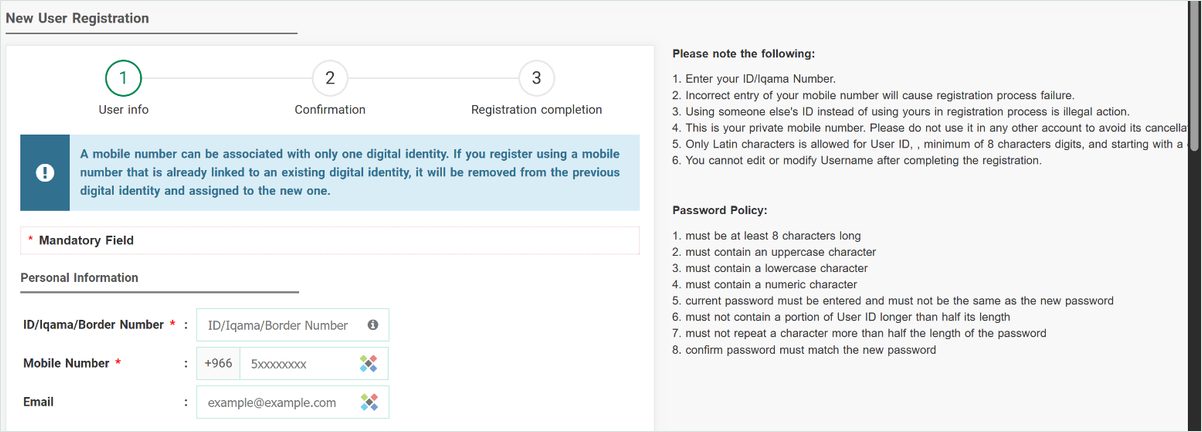
Important: during Absher registration, if you use a mobile number that is already linked to another Absher account, Absher removes the number from that account and moves it to yours. Never register a number that a family member or colleague uses for their own Absher.
How to Activate Your Absher Account
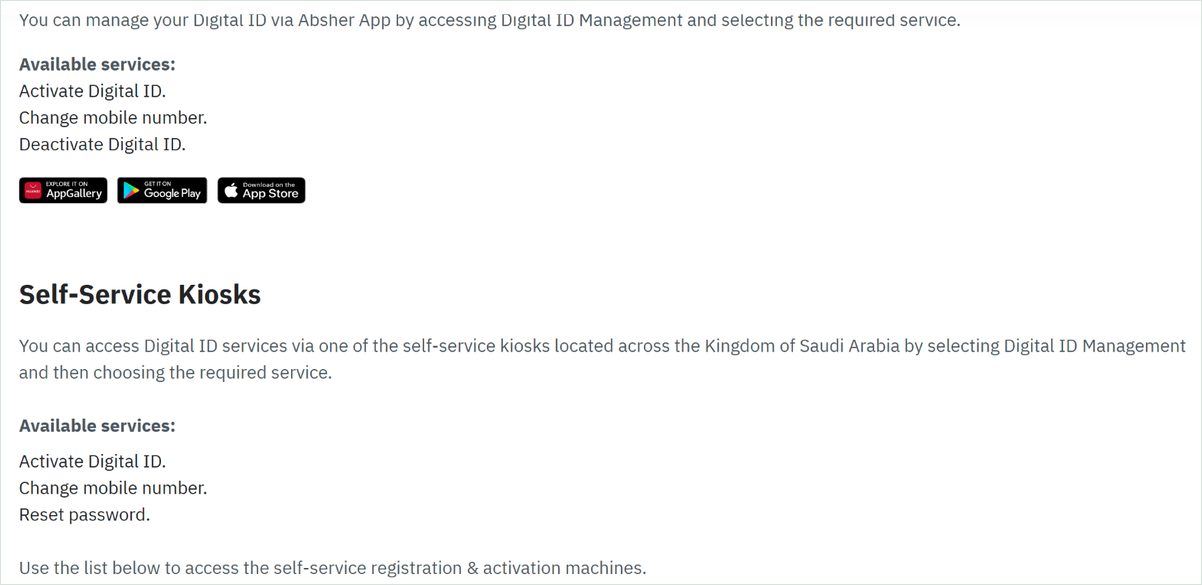
Absher lists five official activation channels. Not every channel can do everything, so pick the right one:
| Channel | Activate | Change mobile | Reset password |
|---|---|---|---|
| Absher app (Digital ID Management) | Yes | Yes | Not listed |
| Self-service kiosk | Yes | Yes | Yes |
| Bank branch (10 banks) | Yes | No | No |
| Nafath app | Yes | Yes | Not listed |
| Officer at Jawazat or Civil Affairs | Yes | Yes | Yes |
Activate at a Bank Branch
Visit a branch and ask for the Absher Digital ID activation service. Absher lists these banks: Al Rajhi Bank, Saudi National Bank (Alahli), Riyad Bank, SAB, Banque Saudi Fransi, Arab National Bank, Alinma Bank, Bank Albilad, Bank AlJazira and the Saudi Investment Bank. Banks can only activate accounts; they cannot change your number or reset your password.
Absher Kiosk Near Me
There are about 846 self-service kiosks across the Kingdom. Most are easy to reach: 413 are inside Mobily shops, and others are at Jawazat offices, Civil Affairs offices, malls such as Lulu and Panda, hospitals, and airports including King Khalid International in Riyadh. Find the nearest one on the official locator under Absher activation channels by choosing your province and city. Kiosks inside government offices follow office hours, for example Sunday to Thursday, 8 am to 2:30 pm. See our city-by-city list of Absher kiosks with timings and the 24-hour kiosks.
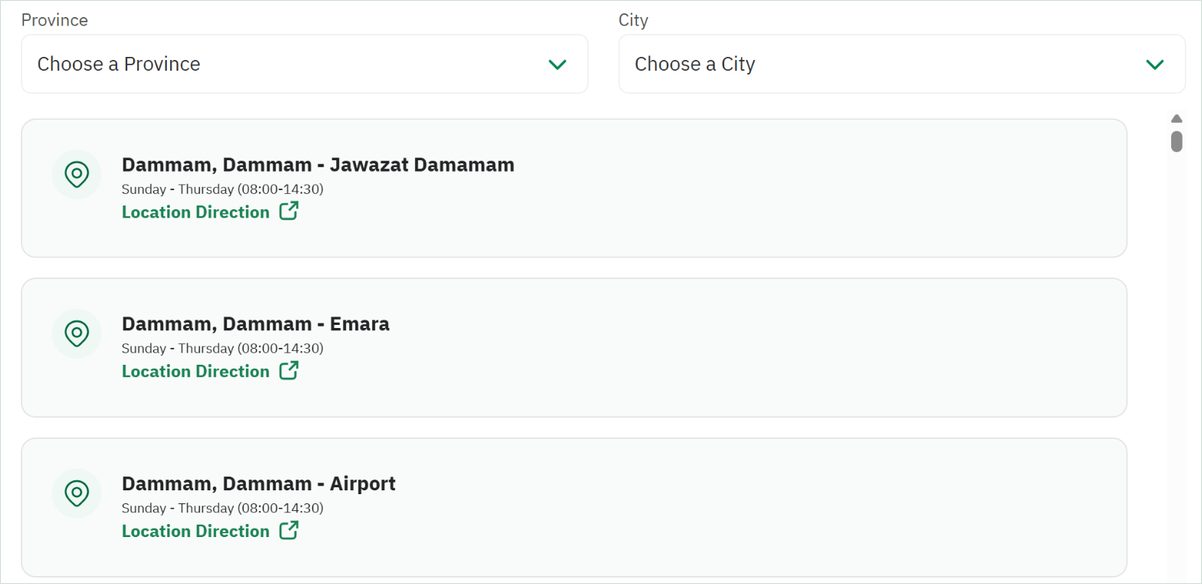
At the kiosk, choose Digital ID Management and then the service you need. The kiosk checks your fingerprint.
If the Kiosk Cannot Read Your Fingerprint
Absher’s advice is to go to the registration and activation staff at Passports (Jawazat) or Civil Affairs, or to activate through your bank instead. To see an officer at Jawazat, book an appointment through Absher under Appointments, then Passports.
Absher Login: Password or Nafath
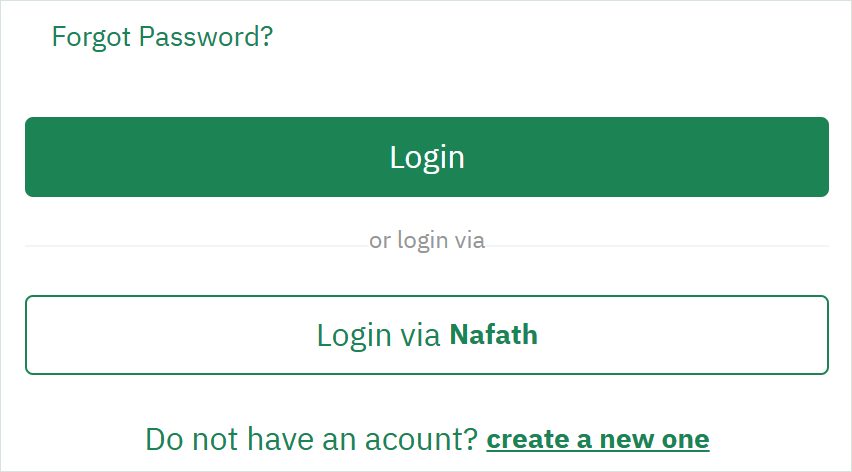
Once your account is active, you can log in with your username or Iqama number and password, or choose “Login via Nafath” and approve the request in the Nafath app. Forgot your username? You can simply log in with your Iqama number instead.
Absher Password Reset: What to Do If You Forgot Your Password
To reset your Absher password online, click Forgot Password? on absher.sa, enter your Iqama number, your registered mobile number and the image code, then the SMS code and a new password. You need the phone that is registered on your Absher account; without it, see the kiosk and officer options below.
- On the login page, click Forgot Password?
- Enter your Iqama number, your registered mobile number and the image code.
- Enter the code sent to your phone and choose a new password that follows the password rules.
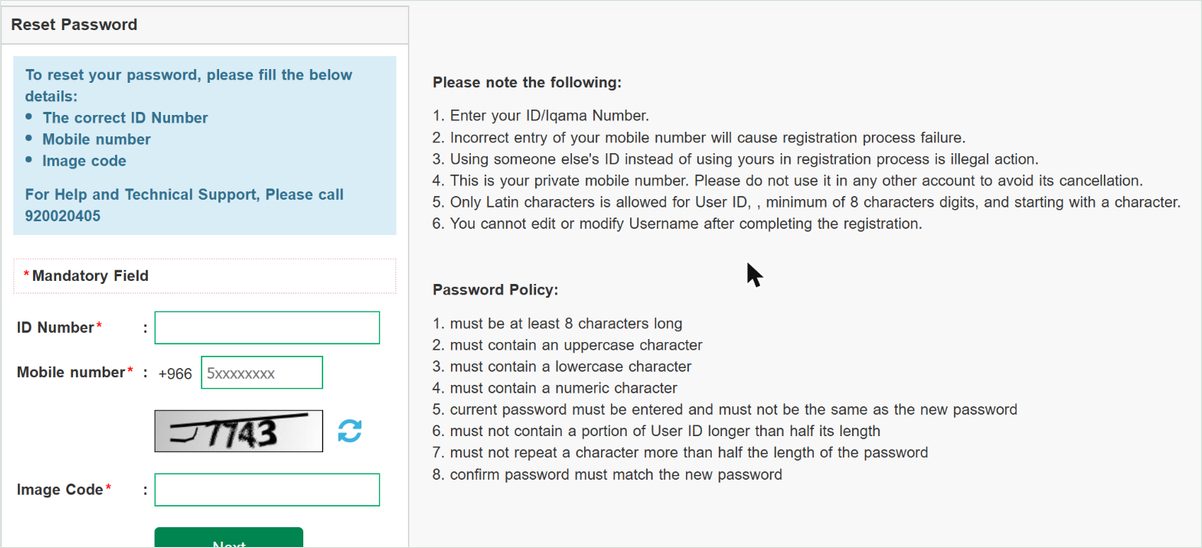
If you no longer have the registered mobile number, reset the password at a self-service kiosk (see Absher kiosk locations) or with an officer at Jawazat or Civil Affairs. Banks cannot reset Absher passwords. Forgot your username as well? Log in with your Iqama number instead. For help, the number printed on the Absher reset page is 920020405.
How to Change Your Mobile Number in Absher
- Absher app: open Digital ID Management and choose to change the mobile number. This also works before login (under More, then Digital Identity Management) if you lost your old number. The new number must be active and registered in your name or the name of a first-degree relative, and the app checks your face with the phone’s cameras.
- Nafath app: the account management section lets you update your mobile number.
- Self-service kiosk or an officer at Jawazat or Civil Affairs.
Do not register your new number on anyone else’s Absher account, or it will be moved away from yours.
How to Update Your Passport in Absher After Renewal
Residents renew their passport at their own embassy in Saudi Arabia, then update the details in Absher. If you are over 18, you can do it yourself:
- Log in and go to My Services, then Passport Services, then Resident Services.
- Choose Update Resident’s Passport Information.
- Upload a clear image of your renewed passport and pay the fee.
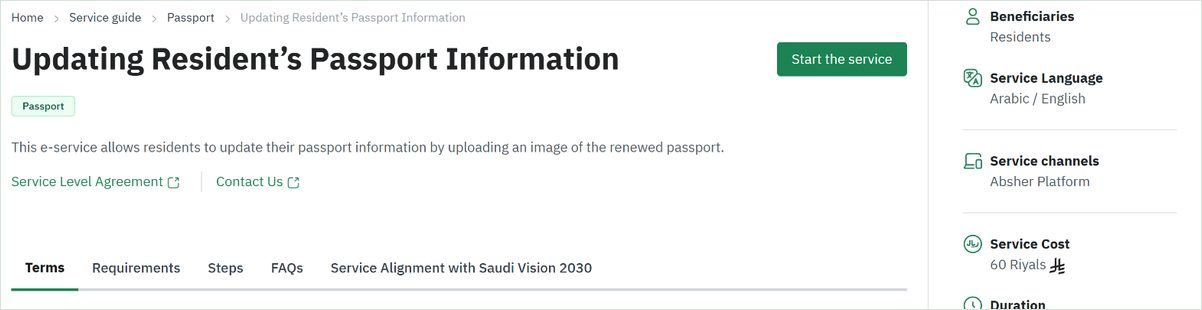
- Fee: SAR 60, which is SAR 69 including VAT.
- Conditions: you must be over 18; you can use the service once every five years; your current passport must have 12 months or less left; you must have no unpaid traffic violations and must not be reported as absent from work.
- Family and domestic workers: the head of family or sponsor updates their passports under Family Member Services or Employee Services, then Update Passport Information.
- Problems: use Tawasul in Absher (My Services, then Services, Passports, Tawasul). Some cases, such as family members moving onto new passports, still need an office visit.
Absher for Family Members
Absher’s FAQ confirms that a family member aged 15 with a national ID can register and activate his or her own account. Every account needs its own mobile number: a parent’s number cannot be used for family members. The head of family manages dependents’ services, such as exit re-entry visas, final exit visas and passport updates, from his own account under Family Member Services.
Absher Electronic Authorization
Absher lets you authorize another person to use certain services on your behalf, for example to visit Passports, Civil Affairs or Traffic for you. Residents can give an authorization, but in August 2026 Jawazat clarified that for many services the authorized person must be a Saudi citizen aged 18 or over, and both people need an active Absher account. An authorization to visit a government sector lasts 7 days, and either person can cancel it at any time.
Common Absher Registration Problems
| Problem | What to do |
|---|---|
| “Mobile number linked to another identity” | Use a number that is not on anyone else’s Absher account. If you continue, the number moves to your account. |
| No SMS code | Check the number you entered. If you no longer have that number, change it at a kiosk or with a Jawazat officer. |
| Fingerprint not read at the kiosk | Activate at a bank branch, or book a Jawazat appointment. |
| Forgot username | Log in with your Iqama number instead; usernames cannot be changed. |
| Account registered but cannot log in | It is probably not activated yet. Use one of the five activation channels. |
Absher Customer Care
Call 920020405 for help and technical support, or email help@absher.sa. Once you are logged in, you can also raise a request through Tawasul.
Now that you have Absher, you can check your Iqama expiry date, your company’s Nitaqat colour and your visas in a few taps.
Frequently Asked Questions
How does Absher registration work?
Go to absher.sa or open the Absher app, choose “create a new one”, enter your Iqama number, a Saudi mobile number that is not used on any other Absher account, a username and a password, then confirm. After that you must activate the account at a bank branch, a self-service kiosk, through the Absher or Nafath app, or with an officer at Jawazat or Civil Affairs.
Is Absher registration possible without an Iqama?
Yes. Visitors can register on Absher with their border number instead of an Iqama. Citizens use their national ID and residents use their Iqama number.
Where can I activate my Absher account?
At any of the 10 Saudi banks Absher lists (in branch), at one of about 846 self-service kiosks (413 of them in Mobily shops), through the Absher app or the Nafath app, or with an activation officer at Jawazat or Civil Affairs.
Can two people use the same mobile number on Absher?
No. Each Absher account needs its own mobile number. If you register with a number already linked to another account, the number is removed from that account and moved to yours. A parent’s number cannot be used for family members’ accounts.
How do I change my mobile number in Absher?
Use Digital ID Management in the Absher app (it also works before login if you lost your old number), the Nafath app, a self-service kiosk, or an officer at Jawazat or Civil Affairs. Banks can only activate accounts, not change the number.
How much does it cost to update my passport in Absher?
A resident updating his or her own passport details pays SAR 60 (SAR 69 including VAT). You must be over 18, and the old passport must have 12 months or less left.
What is the Absher customer service number?
Call 920020405. You can also email help@absher.sa.
How do I reset my Absher password?
On absher.sa click Forgot Password?, enter your Iqama number, your registered mobile number and the image code, then the SMS code and a new password of at least 8 characters with an uppercase letter, a lowercase letter and a number. Without the registered mobile, use a self-service kiosk or a Jawazat or Civil Affairs officer.