



Last updated: 19 October 2026
Ejar KSA is the government rental platform where every residential lease in Saudi Arabia is registered. As a tenant you log in at eservices.ejar.sa with your Iqama number through Nafath, approve the contract your broker sends by SMS, and pay rent through Ejar by mada or SADAD biller 153. Ejar is run under the Real Estate General Authority (REGA), and a lease that is not registered on it has no legal effect.
Many expats in Saudi Arabia meet Ejar for the first time when a broker texts them a link and a code, often in Arabic, the week they move in. This guide explains what each step means for you as the tenant, what the landlord must pay, and the 2025 rules that changed renewals and rents, especially in Riyadh.
What Is Ejar KSA and Why Your Lease Must Be on It
Ejar is an electronic network that organises the rental sector between tenants, landlords and licensed real estate brokers. Registering residential leases has been mandatory since the network launched in February 2018, and Council of Ministers Resolution 292 says a lease not registered on the network has no administrative or judicial effect. Government agencies check leases through Ejar.
For expats this matters in three practical ways:
- Your work permit: the same resolution requires an Ejar lease for issuing or renewing a non-Saudi’s work permit, which your employer handles through Qiwa.
- Your protection: the unified Ejar contract is an executive document. Rights and duties are written down, and unpaid amounts go straight to the Enforcement Court without a normal lawsuit. That works both ways, so pay on time.
- Your utilities and address: the electricity and water accounts move into your name through Ejar, and the unit’s national address is linked to you automatically.
Follow Saudi Life Guide for Iqama, visa and job updates
New rules, fees and news as soon as we publish them. Join 60,000+ followers on Facebook.
Ejar Login for Tenants (English, With Nafath)
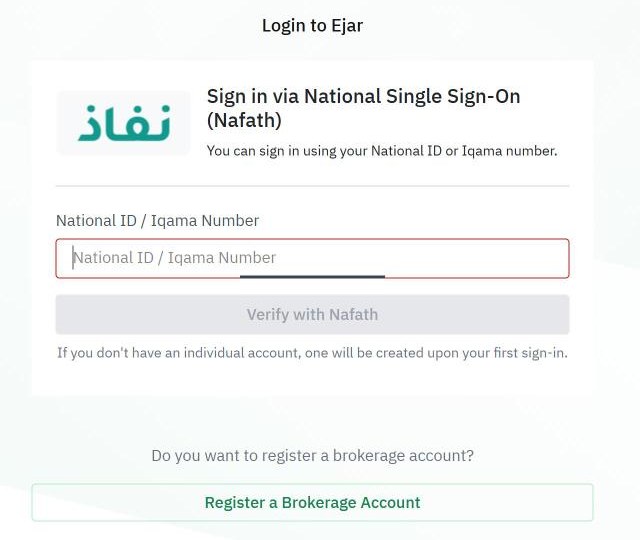
There is no username or password any more. Ejar login works only through Nafath, the national single sign-on, and the same steps work in English and Arabic:
- Open eservices.ejar.sa/en/nafath-login (check that the address starts with eservices.ejar.sa).
- Enter your Iqama number (or National ID) in the National ID / Iqama Number field.
- Click Verify with Nafath, open the Nafath app on your phone and tap the number shown on the Ejar screen.
- If this is your first time, Ejar creates your individual account automatically. There is no separate tenant registration.
If Nafath fails, the problem is usually your Nafath or Absher profile, not Ejar. Your mobile number must also be registered to your Iqama, because Ejar sends contract codes to the mobile number in Absher. See how to register a mobile number with your Iqama.
Is there an Ejar app? Ejar’s own site lists the Sakani app as its official alternative channel for accepting contracts and for the move-in and move-out forms. Otherwise, use eservices.ejar.sa in your phone’s browser. Be careful with unofficial apps that use the Ejar name.
How the Ejar Contract Works for Tenants
The tenant does not create the contract. A licensed real estate broker (or a landlord who meets the broker requirements) enters the contract details, the parties, the rent and payment schedule, the terms and the unit, pays the fee and sends it to both sides for approval.
Approving the contract
- Ejar sends an SMS with a link to the tenant and the landlord.
- Open the link (or log in and open your contracts list, or use the public contract approval page with your Iqama number).
- Enter the code sent to your Absher-registered mobile.
- Read the contract and download the PDF. Check the rent, payment schedule, start and end dates, deposit, and who pays for shared utilities and maintenance.
- Approve, or reject with a reason if something is wrong.
Both parties must approve within 7 days. Otherwise the contract goes back to the broker as a draft. Once both approve, the status changes to Registered and the contract starts on its start date. Ejar says approval through Absher is not available, so ignore anyone who tells you to look for the contract there.
You do not need a letter from your employer or sponsor: a valid Iqama and an Absher-registered mobile number are enough. Family members and other occupants can be added to the contract as companions by the broker.
Ejar contract fees: who pays what
| Fee | Amount | Who pays |
|---|---|---|
| Residential contract registration | SAR 125 per year | Landlord (Ejar FAQ) |
| Renewal of the contract | Same contract fee | Landlord, from the landlord’s Ejar wallet |
| Rental incident (registering a paper lease the other side refused) | SAR 250 per year (residential) | The party who files it |
| Lease Contract Transfer to a new tenant | SAR 250 (residential) | The party who requests it |
| Termination by both parties | No fee | None |
Source: Ejar residential contract service and Ejar’s FAQ, read 19 October 2026. Broker commission is a separate matter between you and the broker, so ask for it in writing before you sign.
Paying Rent Through Ejar (SADAD 153 and mada)
Since 15 January 2024, REGA requires rent on new residential contracts to be paid through Ejar’s digital channels. Payments made outside them, such as cash or a direct transfer to the landlord, are not recognised as proof of payment. The money reaches the landlord’s bank account within 5 business days, and Ejar issues the receipt automatically.
- Log in to Ejar and open Finance, then View invoices.
- Choose your contract and the due invoice, then Make a payment.
- Pay by mada card or Apple Pay, or pay through your bank app under SADAD with biller code 153 and the invoice number shown.
- Download the receipt later from Finance, then View receipts.
The schedule (monthly, quarterly, half-yearly or yearly) is whatever you agreed in the contract, and rent is paid in advance for each period. Contracts documented before 15 January 2024 and commercial leases are outside this rule.
Security Deposit: How Ejar Holds It
A deposit is optional. If your contract includes one, Ejar holds it, not the landlord. The amount is reserved from your Ejar wallet before you approve the contract, so top up the wallet first. If the contract is never documented, the money is released back to you.
- Move-in form: landlord and tenant fill it in within 7 days of the start date. Take photos of every room and note existing damage in your comments.
- Move-out form: filled in within 7 days after the end. The deposit is refunded to your wallet based on the approved form, minus only the actual cost of any damage.
- Getting the money out: add your IBAN in the wallet and confirm with the code sent to your Absher mobile.
Electricity, Water and National Address
When the contract is documented, Ejar’s free Financial Liability Transfer service moves the electricity and water meter accounts into the tenant’s name. It is mandatory, both parties approve it, and you need the meter number from the bill. You do not take over the previous occupant’s arrears where the meter’s owner is registered with SEC, and Saudi Electricity sends both sides an SMS when the transfer is done. To check bills, see our electricity bill check and water bill check guides.
The national address on your contract is the unit’s address, and Ejar links it to you. To manage your own address on SPL, follow our national address guide.
Renewal, Ending the Contract and the 2025 Rules
Royal Decree M/73, announced on 25 September 2025, changed the rules for tenants across the Kingdom and especially in Riyadh:
- Automatic renewal, all cities: a lease renews automatically unless one party notifies the other at least 60 days before it ends. The tenant, landlord or broker can switch auto-renewal off on Ejar, and the other side gets an SMS.
- Riyadh rent freeze: inside Riyadh’s urban boundary, the landlord cannot increase the total rent on existing or new residential and commercial leases for 5 years from 25 September 2025. No other city is included as of 19 October 2026.
- Riyadh renewal protection: if you want to renew, a Riyadh landlord can refuse only for non-payment, structural danger confirmed by a technical report, or the landlord’s or a first-degree relative’s own use.
- Own use notice: REGA has since raised the notice for not renewing a standard residential lease for the landlord’s own use to at least 365 days before the end.
- Outside Riyadh: a landlord who wants to change the rent must send the request on Ejar at least 90 days before the end. If you reject it, the contract does not renew and ends on its end date.
- Penalties: breaking these rules can bring a fine of up to 12 months’ rent.
Leaving early, including on final exit
The Ejar contract binds both sides for its full term. Early exit is possible by mutual agreement or on limited legal grounds such as a court ruling or an unsafe building. In practice, expats leaving the Kingdom have three routes:
- Termination by both parties: you and the landlord agree, any dues are settled, and the cancellation is recorded on Ejar with no fee.
- Lease Contract Transfer: you hand the rest of the term to a new tenant at the same rent. The landlord must approve it on Ejar, and the fee is SAR 250 for residential.
- Let a fixed-term contract run out after switching off auto-renewal at least 60 days before the end.
Do this before your final exit visa date, and complete the move-out form so your deposit and the meter handover are settled while you are still in the country.
Common Ejar Problems and What to Do
- The landlord will not register the lease: since September 2025 the landlord is obliged to register, and the tenant may apply. If you have a paper contract, the Rental Incident service lets you register it on Ejar so you can claim your rights in court.
- You never received the SMS: check that the broker entered your correct Iqama number, and that your mobile is registered to your Iqama in Absher. You can also check pending contracts on the public approval page.
- The contract has wrong details: reject it with a reason. Only the broker can edit the unified contract.
- The lease is in your company’s name: your employer is then the tenant on Ejar, so renewals and approvals happen on their account. Ask HR for a copy of the contract.
- Maintenance is ignored: the contract makes the landlord responsible for structural and periodic maintenance, and the tenant may take legal action for losses.
Ejar support: phone 199011, live chat and complaint forms on the Ejar help page. Before you sign, compare rents and running costs with our cost of living calculator, and if you are new to the country, see our moving to Saudi Arabia checklist.
Frequently Asked Questions
How do I log in to Ejar in English?
Open eservices.ejar.sa/en/nafath-login, enter your Iqama or National ID number and click Verify with Nafath. Approve the number shown in the Nafath app on your phone. There is no separate registration for tenants: Ejar creates your individual account the first time you sign in through Nafath.
Who pays the Ejar contract fee?
The landlord. Ejar’s residential contract fee is SAR 125 per year, and Ejar’s FAQ says the landlord bears the cost of registering and documenting the contract, including renewals. If a broker or landlord asks you to pay it, you can point them to the Ejar FAQ or ask Ejar support on 199011.
Can I pay rent in cash or by bank transfer?
Not for new residential contracts. Since 15 January 2024, REGA requires rent on new residential Ejar contracts to be paid through Ejar’s digital channels, such as mada or SADAD biller code 153. Payments made outside these channels are not accepted as proof of payment, so you could be treated as not having paid.
Can I approve my Ejar contract through Absher?
No. Ejar says contract approval through Absher is not available on the upgraded platform. You approve through the SMS link Ejar sends to your Absher-registered mobile number, through your Ejar account, or through the Sakani app. Both parties must approve within 7 days or the contract returns to the broker as a draft.
How do I end my Ejar contract before leaving Saudi Arabia on final exit?
The contract binds you for its full term, so agree an early end with your landlord and record it on Ejar through Termination by both parties, which has no fee. If the landlord refuses, you can hand the remaining term to a new tenant through Lease Contract Transfer, which the landlord must approve. Fill in the move-out form so your deposit is settled.