


Last updated: 8 November 2026
To book an Absher appointment, log in to Absher Individuals, open Appointments, pick the sector (Passports for Jawazat, Civil Affairs, Expatriate Affairs for Istiqdam, or Traffic), then choose the service, region, branch, date and time and confirm. Booking is free (my.gov.sa lists Traffic and Istiqdam appointments as free services), and the confirmation screen lists the documents to bring. You only need one when a service cannot be finished online.
Below are the real screens from a resident’s account in November 2026, the limits per sector, and fixes for empty slots.
Quick answer: which Absher sector to choose
| Sector in Absher | Office you visit | Typical reasons for an expat | Services per booking |
|---|---|---|---|
| Passports | Jawazat | Fingerprints, a lost passport report, Absher activation when the kiosk cannot read your fingerprint, problems Absher cannot fix online | Shown on screen |
| Civil Affairs | Al Ahwal | Birth registration, replacement birth certificate | Up to 5 |
| Expatriate Affairs | Istiqdam office | Family recruitment (permanent family visa), visit for first-degree relatives, opening an Istiqdam file | 1 |
| Traffic | Muroor | Lost or damaged licence, accident procedures, plates, driving school training | Up to 2 |
You need an activated Absher account first. If you do not have one yet, follow our Absher registration and activation guide.
Follow Saudi Life Guide for Iqama, visa and job updates
New rules, fees and news as soon as we publish them. Join 95,500+ followers on Facebook.
Absher appointment booking: step by step
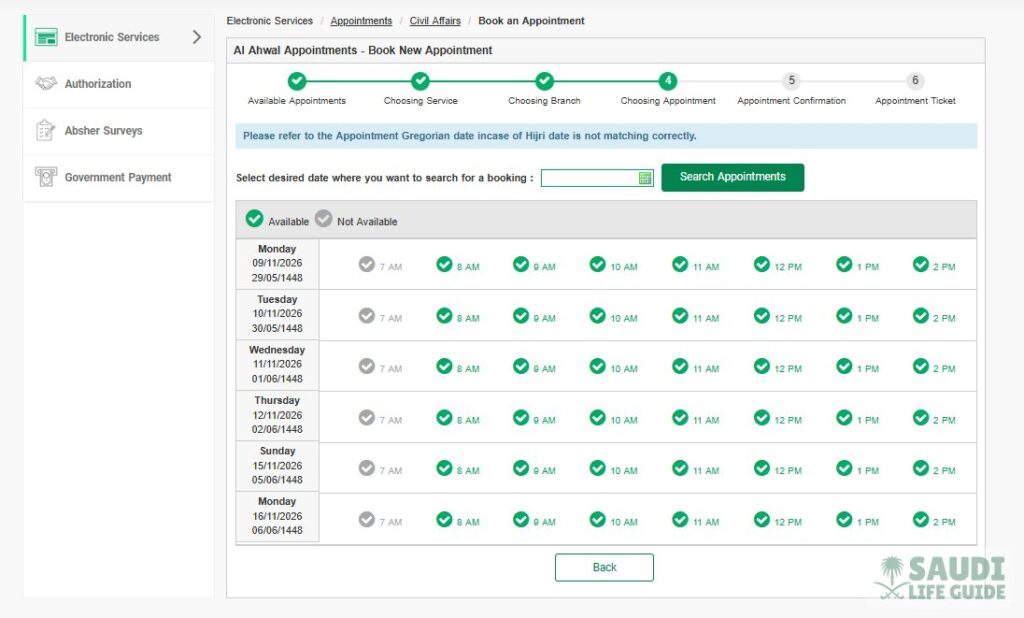
Every sector uses the same six-step bar at the top of the screen: 1 Available Appointments, 2 Choosing Service, 3 Choosing Branch, 4 Choosing Appointment, 5 Appointment Confirmation, 6 Appointment Ticket.
- Log in at absher.sa with your iqama number and password, or through Nafath.
- On the home screen, click the Appointments tile (next to My Services, Vehicles, Family Members and Workers).
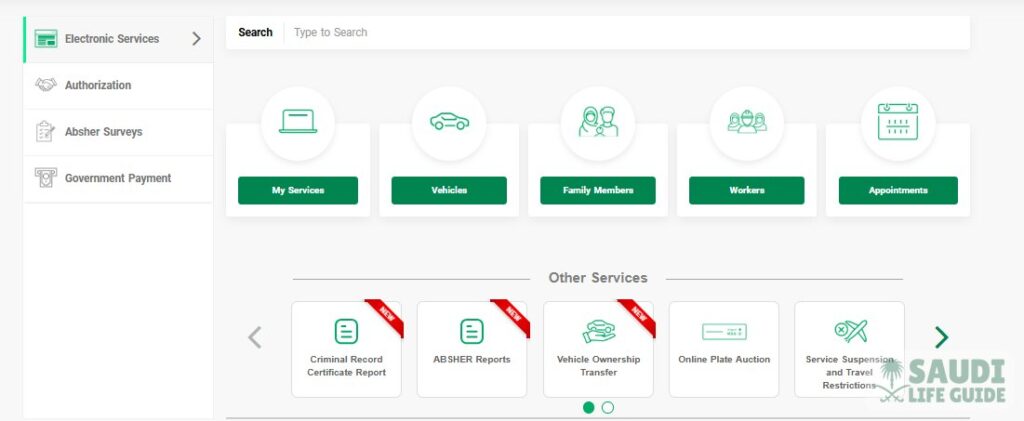
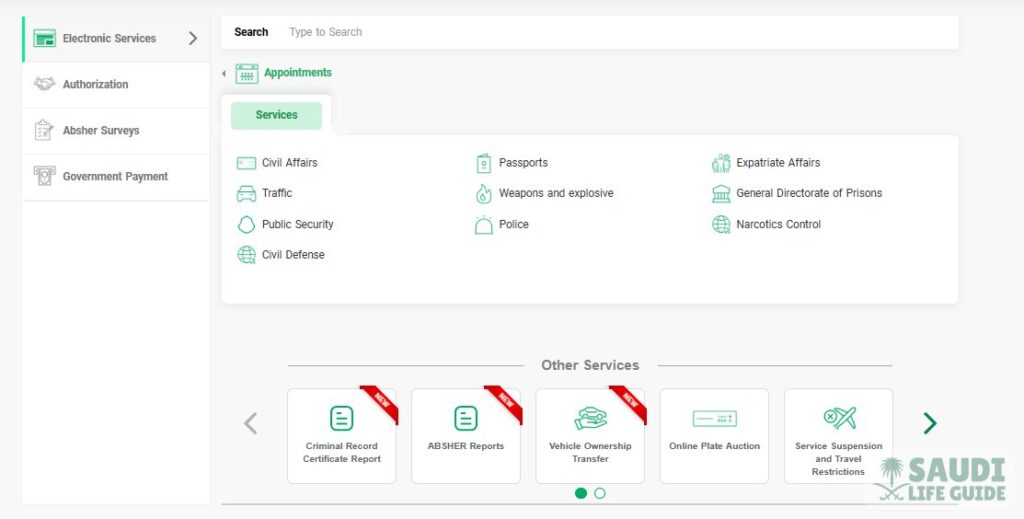
- Under Services, pick the sector: Civil Affairs, Passports, Expatriate Affairs, Traffic, Weapons and explosive, General Directorate of Prisons, Public Security, Police, Narcotics Control or Civil Defense.
- Choosing Service: tick the service or services you need and choose your Region. Each sector caps how many services fit in one booking (see the table above).
- Choosing Branch: select the office in that region.
- Choosing Appointment: pick a date, click Search Appointments, then click a free hour in the table. A green tick means Available, a grey tick means Not Available.
- Appointment Confirmation: check the required documents, branch, address, city, region, day, and the date and time in Gregorian and Hijri. There is also a QR code and a map link to the branch. Click Confirm Appointment Details.
- Appointment Ticket: save it as a PDF or screenshot, or print it.

The time slots show Gregorian and Hijri dates side by side. Absher itself tells you to refer to the Gregorian date when the Hijri date does not match. On our own confirmation screen, the Hijri line even showed 11:06 against an 11:00 Gregorian slot. Go by the Gregorian date and time. Our Hijri date today page converts between the two.
Jawazat appointment (Passports)
Most Jawazat services for residents now run online on Absher, Absher Business and Muqeem. Jawazat’s guidance is to book an appointment and visit only when a transaction cannot be completed online. The Absher path is Appointments > Passports > Book an Appointment. For residents, Jawazat’s published steps use the appointment type Resident Services, then region, office, date and time.
Cases where Jawazat or Absher tell residents to book a visit include:
- Fingerprint (biometric) registration for family members, including children from age 6.
- Reporting a lost passport and getting the printed loss slip for your embassy.
- Activating Absher or changing your Absher mobile number when the self-service kiosk cannot read your fingerprint.
- A second passport update on Absher within five years, which the online service does not allow.
Take the appointment ticket, your original passport and your iqama. For office locations and hours, see our list of Jawazat offices in Riyadh, Jeddah and Dammam. The Passports services screen was not part of our November screenshots, so pick the type that matches your case on screen.
Civil Affairs (Al Ahwal) appointment
The screen is titled Al Ahwal Appointments – Book New Appointment. It says “You can select maximum 5 services”. For non-Saudis, the services shown were Birth Registration, Register Marriage of a Saudi Woman to a Foreigner, and Issuance of a Replacement for a Lost or Damaged Birth Certificate. If your service is not listed, the screen asks you to contact the Civil Affairs sector on 920022133.

For Birth Registration, the confirmation screen listed these requirements (translated from Arabic):
- Fill in the form for the service.
- Original iqamas of the husband and wife, with copies.
- Original passports of the husband and wife, with copies.
- If 30 days have passed since the birth, a fine must be paid.
- The original birth notification from the hospital if it was issued manually. The appointment must then be in the region where the notification was issued.
- A copy of proof of marriage if the other documents do not show it.
Traffic (Muroor) appointment
Traffic Appointments allows a maximum of 2 services per booking. The main groups:
- Licences: Issuing a driver license for a damaged / lost, Replacement of driving licenses, Renewal of a driving license, Print a driver license.
- Vehicles: Vehicle registration license procedures, Replacement of vehicle plates, Exporting vehicle abroad, Vehicle impounded procedures.
- Accidents: End Traffic Accident Procedures, Print a Traffic Accident Report.
- Driving schools: the 30-hour beginner course and a driving assessment for people who can already drive.

The Absher FAQ adds that once you book, “all requirements for the selected service will be shown”, so read the confirmation page before you go. For a first licence, the full process is in our driving licence guide. For accidents, check whether the case belongs to Najm or Muroor first: our Muroor accident report guide explains the difference.
Istiqdam appointment (Expatriate Affairs)
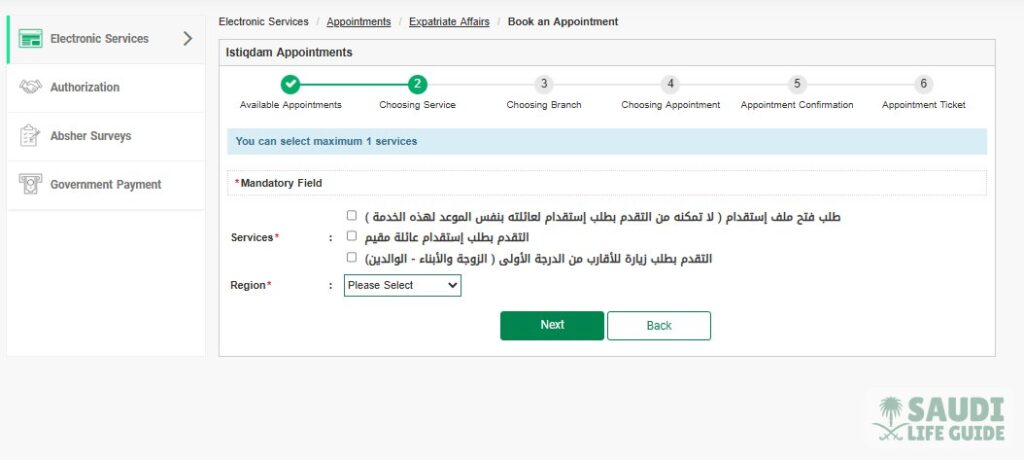
Under Expatriate Affairs, the screen is titled Istiqdam Appointments and says “You can select maximum 1 services”. The three options are in Arabic:
- Request to open an Istiqdam file. The screen notes that this does not let you apply for your family’s recruitment in the same appointment.
- Apply for a resident’s family recruitment (the permanent family visa).
- Apply for a visit for first-degree relatives (wife and children, parents). Most families now do this online, see our family visit visa guide.
The Absher FAQ gives one clear case for this: your online family visa request is rejected with the note “Your application cannot be processed because it does not fulfill Istiqdam e-service business rules”, although your profession is eligible. You can then book an appointment and submit the application at an Expatriate Affairs branch.
The ticket lists the documents. On our own family recruitment ticket from 2024 (Riyadh Istiqdam office), they were: a copy of the marriage contract; the family recruitment form; a letter from the employer approving the recruitment and stating the monthly income, attested by the Chamber of Commerce; an iqama copy (original for matching); a passport copy; a copy of your educational qualification (original for matching); children’s birth certificates if they are included; and copies of the family members’ passports. The ticket also states that receiving the application does not mean it is approved, and that the office can ask for more documents.

The ticket also says you must bring it, with the requirements, when you visit branches and recruitment offices. Requirements change, so go by your own ticket.
How to view, change or cancel an Absher appointment
- Log in to Absher and open Appointments.
- Choose the same sector you booked with, for example Civil Affairs.
- The first step, Available Appointments, is where that sector’s existing bookings are listed with their service, branch and time.
- Use the option next to the appointment to change or cancel it, and confirm.
Button names can differ by sector. If there is no change option, cancel and book again. If a booking does not show or will not cancel, call Absher support on 920020405. We found no official penalty for missing an appointment, but cancel rather than not turning up, so the slot goes to someone else.
What to bring and what it costs
| Item | What to know |
|---|---|
| Booking fee | Free. The national platform my.gov.sa lists Traffic and Istiqdam appointment booking as free services. |
| Appointment ticket | Printout or screenshot. The Istiqdam ticket says it must be brought with the requirements. |
| Identity | Original iqama and passport. Many services also ask for copies. |
| Service documents | The list on your confirmation screen or ticket. It differs by service. |
| Service fees and fines | Separate from the booking. Example: a late Birth Registration (after 30 days) carries a fine. Pay what Absher shows before or at the visit. |
| Office days | The slots we saw were Sunday to Thursday only. |
Common problems and fixes
| Problem | What to do |
|---|---|
| No slots, all grey | Search a later date, try another branch in the same region, or check again later. |
| The branch you want is not listed | Check the Region. Branches only show for the region you picked at Choosing Service. |
| Birth notification from another region | For a manual hospital notification, the Civil Affairs appointment must be in the region where it was issued. |
| Hijri and Gregorian dates do not match | Go by the Gregorian date, as Absher advises. |
| Your Civil Affairs service is not in the list | Call the Civil Affairs sector on 920022133, as the booking screen says. |
| Absher login or activation fails | Fix the account first: activation at a bank or kiosk, or a Passports appointment if the kiosk cannot read your fingerprint. |
Tips from real expat experience
- Based on real expat experience in KSA, the Absher website on a laptop shows the slot table and service lists more clearly than a phone screen.
- Read the requirements on the confirmation screen before you confirm, and take originals and copies. A missing document can mean a second visit.
- Family services such as Birth Registration and family recruitment are booked by the head of the family from his own account. When the visit is for a family member, such as a child’s fingerprints at Jawazat, take that person with their passport and iqama.
- Arrive a little before the time on your ticket, and keep the ticket ready on your phone and on paper.
Frequently asked questions
Is an Absher appointment free?
Yes. my.gov.sa lists the Traffic and Istiqdam appointment services as free, and no booking fee appeared on our Civil Affairs screens either. Any fee for the service itself, or a fine such as late birth registration, is paid separately.
Can I visit Jawazat without an appointment?
Jawazat’s guidance is to book an appointment on Absher and then visit, and only for transactions that cannot be done online. Book first so you are not turned away.
How do I cancel a Jawazat appointment?
Log in to Absher, open Appointments, choose Passports, and find the booking on the Available Appointments step. Cancel it there and confirm. If it does not appear, call Absher support on 920020405.
How do I book an Istiqdam appointment for my family visa?
Go to Absher, then Appointments, then Expatriate Affairs, and choose the family recruitment option, your region, branch, date and time. Absher points residents to this route when the online family visa request is rejected under the Istiqdam e-service business rules.
Can I book an Absher appointment on my phone?
The screens in this guide are from the Absher website, absher.sa, which also opens in a phone browser. If you use the Absher app and cannot find Appointments in your version, use the website instead.
Sources: Absher Individuals appointment screens (absher.sa, November 2026); Absher FAQs (Passports, Civil Affairs, Traffic and General tabs); my.gov.sa Appointments Service (Traffic) and Book an Appointment (Istiqdam); General Directorate of Passports statements on X as reported by Ajel (September 2026) and Gulf News (September 2024).