


Last updated: 25 October 2026
A Muqeem print, often called Muqeem paper, is the official Muqeem Report: a printable record of a resident’s iqama, passport, visa and sponsor details with a report reference number. It is valid for 30 days, and the office that receives it checks it online with your iqama number and that reference number. Family heads issue it on Absher Individuals; company workers get it from their employer through Absher Business or the Muqeem portal.
Many expats in Saudi Arabia first hear the words “Muqeem paper” when an embassy, a visa centre or a school asks for one, and nobody explains what it is. This guide covers what the report shows, who is allowed to issue it for whom, what it costs, how long it lasts, how it is verified, and how it differs from an exit re-entry visa print and the Makkah entry permit that people also call a “Muqeem print”.
What Is a Muqeem Print?
Muqeem is the resident-data platform for businesses. It was built by Elm with the General Directorate of Passports (Jawazat), and it lets establishments see their resident employees’ data and complete passport transactions online without visiting a Jawazat office (muqeem.sa).
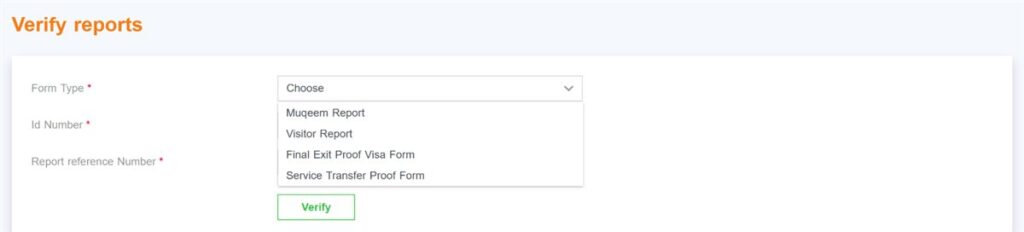
The Muqeem print people ask for is the report the system produces from that data. On muqeem.sa it is listed as the Muqeem Report, next to a Visitor Report, a Final Exit Proof Visa Form and a Service Transfer Proof Form. Absher produces the same kind of electronic report for individuals under the name Absher Reports.
Three things make it different from a photocopy of your iqama:
- It carries a report reference number.
- It is valid for 30 days from the day it is issued, then it is void.
- Any office can check it online with your iqama number and the reference number, so it cannot simply be edited.
Follow Saudi Life Guide for Iqama, visa and job updates
New rules, fees and news as soon as we publish them. Join 65,000+ followers on Facebook.
What the Muqeem Report Shows
The report pulls the resident’s record straight from the passports system. Expect your name, iqama number and expiry, passport details, nationality, occupation, sponsor or employer, and current visa status, for example an exit re-entry visa that is issued or used. The exact fields depend on the type of report chosen, which is also why Absher says the fee varies.
Because the data comes from the system, a Muqeem print is only as correct as your record. If your passport number or occupation is wrong on the report, the fix is to correct the record through your employer or Jawazat, not to ask for another print. Check your dates first on our iqama expiry date guide.
Who Can Get a Muqeem Print: Worker, Employer or Family Head
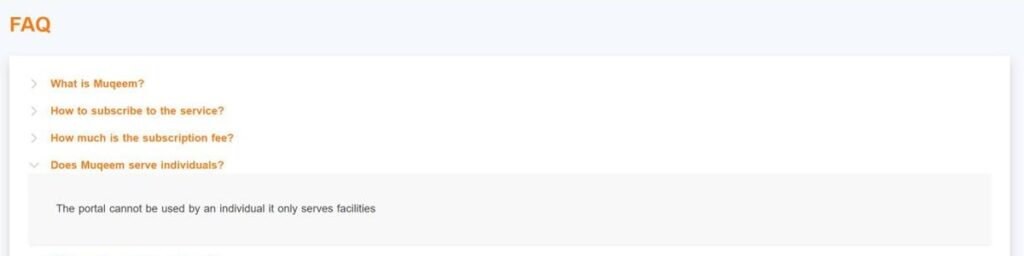
This is the part that confuses most expats. The Muqeem portal says it cannot be used by an individual and only serves establishments (Muqeem FAQ). So who issues your report depends on who sponsors you.
| Your situation | Who issues the Muqeem print | Where |
|---|---|---|
| Private-sector employee on a company iqama | Your employer (HR or PRO) | Absher Business (Request Muqeem Print) or the Muqeem portal |
| Wife, children or parents on your iqama (dependents) | You, as the family head | Absher Individuals, Absher Reports |
| Your house driver or domestic worker | You, as the sponsor | Absher Individuals, Absher Reports |
| Business owner printing for staff | The establishment owner or authorised user | Absher Business or Muqeem |
In practice, if you work for a company and need your own Muqeem paper for a family visit visa or a trip abroad, send a short request to HR with what you need it for. Most HR teams can issue it quickly because it takes a few clicks on their side.
How to Print the Muqeem Report on Absher (Individuals)
Absher lists this service as Absher Reports: it lets citizens and residents issue and review electronic reports. You need a digital identity registered and activated on Absher. If you have not set it up yet, follow our Absher registration guide first.
- Log in to Absher Individuals with your iqama number, password and the OTP.
- Open Services, then General Services.
- Choose Absher Reports.
- Pick the report and the person (yourself, a dependent or a domestic worker), then issue it.
- Check the fee shown on screen and pay from your linked bank.
- Download or print the report. Note the reference number: the receiving office needs it.
Previous reports stay visible in the same section while they are still within their 30 days, so you can print the same report again without paying twice.
How Employers Print It: Absher Business and Muqeem
On Absher Business the service is called Muqeem Print Request. It lets the owner of an establishment pull and print the basic information of its workers online. The path is Absher Business, then My Business Services, then Request Muqeem Print. Absher Business states the report is valid for 30 days from issue and is void after that.
Companies that subscribe to the Muqeem portal can also print iqama data there. Muqeem sells yearly packages based on how many residents a company has. The Basic package includes passport services and iqama printing; for 0 to 9 residents it costs SAR 1,100 a year, and SAR 2,300 for 10 to 49 (Muqeem FAQ). This is the company’s cost, not something an employee pays.
Muqeem Print Fee and Validity
- Validity: 30 days from issue, on both Absher Reports and Absher Business.
- Fee on Absher Individuals: Absher says the fee depends on the type of data in the report. The exact amount appears on the screen before you pay, so you always know the price first.
- Fee for a company worker: normally nothing for you. The employer issues it through its own Absher Business or Muqeem account.
Plan the timing. If an embassy appointment is in five weeks, do not print the report today: by the appointment it will be past 30 days and can be rejected. Print it within a week or two of the date you need it. For your other yearly costs, see Saudi Arabia iqama fees and iqama renewal fees for 1 year.
How to Verify a Muqeem Print
Verification is free and public. There are two official ways:
- Muqeem Verify reports: open muqeem.sa Verify reports, choose the form type (Muqeem Report, Visitor Report, Final Exit Proof Visa Form or Service Transfer Proof Form), and enter the ID number and the report reference number. No login is needed.
- Absher Query Resident Report: the Absher service to look up a resident report electronically. It only displays the report and does not allow any changes.
If you receive a Muqeem print from someone else, for example from a worker you are about to hire, check it this way instead of trusting the paper. A report that does not show up, or shows different details, is a red flag.
Muqeem Visa Print: Exit Re-Entry Visa Printout
When people search “Muqeem visa print” they usually mean a printout of an exit re-entry visa. For company workers, the employer issues the exit re-entry visa through Muqeem and can print it from there. Family heads issue visas for dependents and domestic workers on Absher Individuals, under Family Members Services or Employee Services.
To check a visa rather than print it, Muqeem runs a separate Visa Validity Portal at vv.muqeem.sa. According to its official user manual, you register with your ID number and date of birth (OTP to your Absher mobile number), then check an exit re-entry visa by iqama number or a visit visa by border number. Absher Individuals also has an Exit/Re-Entry Visa Status service, and our Saudi visa check guide covers checks by passport number.
For visa types, fees, single versus multiple and how long you can stay out, see our full exit re-entry visa guide. Leaving for good is a different process: see the final exit visa guide.
Makkah Entry Permit Print During Hajj Season
The spike in searches for “Muqeem print” every April has a different cause: the Makkah entry permit. In the weeks before Hajj, residents need a permit to enter Makkah, and establishments issue it through a Muqeem portal at makkahpermit.muqeem.sa.
- 2026 timeline: from Monday 13 April 2026 (25 Shawwal 1447), residents without a permit were turned back at Makkah entry points. Holders of a Makkah-issued iqama, a Hajj permit, or a work permit for the holy sites were exempt (SPA, 13 April 2026).
- Who applies where: Absher Individuals issues permits for domestic workers, dependents, Premium Residency holders, investors, mothers of citizens and GCC citizens. Muqeem issues them for workers of establishments based in Makkah, seasonal work visa holders and contractors working there during Hajj. No visit to a passports office is needed.
- Digital is fine: permits shown in Tawakkalna were accepted at Makkah entrances and checkpoints, verified through the Tasreeh platform (SPA, 23 May 2026).
Expect the same system before Hajj 2027. If you plan to perform Hajj yourself, read our Hajj leave guide early, as the permit rules and leave rules run on the same calendar.
Common Problems and Fixes
| Problem | What it usually means | Fix |
|---|---|---|
| No option to print my own report on Absher | You are on a company iqama | Ask HR to issue it through Absher Business or Muqeem |
| Office rejected the print | It is older than 30 days | Issue a fresh report close to the appointment date |
| Wrong passport number or occupation | Your record is out of date | Update the record through your employer or Jawazat, then print again |
| Verify reports shows nothing | Wrong form type, ID or reference number | Re-enter the details and choose the right form type |
| Iqama expired or about to expire | Many services are blocked | Renew first; see the complete iqama guide |
Where You Usually Need a Muqeem Print
Based on real expat experience in KSA, the requests come from a few places:
- Family visit visa paperwork, for example at a visa centre in your home country. See our family visit visa guide and the Tasheer appointment guide.
- Visa applications to other countries made from Saudi Arabia, where the embassy wants proof of legal residence.
- Schools, banks or landlords that want proof of status and sponsor.
Each office sets its own checklist, so ask whether they want the Muqeem Report specifically or just an iqama copy before you pay for a report. Our free Saudi calculators and tools help with the rest of your iqama and visa planning.
Frequently Asked Questions
What is a Muqeem paper?
Muqeem paper is the everyday name for the Muqeem Report, an official printout of a resident’s iqama, passport, visa and sponsor details. Each report has its own reference number, stays valid for 30 days from the day it is issued, and can be checked online by the office that receives it.
Can I print my Muqeem paper myself on Absher?
Yes for your dependents and domestic workers: a family head issues their report through Absher Reports on Absher Individuals. If you work for a company and hold a company iqama, your employer issues your report through Absher Business or the Muqeem portal, so ask your HR or PRO.
How much does the Muqeem print cost?
On Absher Individuals the fee depends on the type of data in the report, and the exact amount is shown on screen before you pay through your linked bank. For company workers the employer issues the report from its own Absher Business or Muqeem account, usually at no cost to the employee.
How long is a Muqeem Report valid?
A Muqeem Report is valid for 30 days from the date it is issued, on both Absher Reports and Absher Business. After 30 days it is void and offices will not accept it, so print a fresh report close to your embassy, visa centre or school appointment.
How can an embassy or office verify my Muqeem print?
The office opens the public Verify reports page on muqeem.sa, chooses the form type Muqeem Report and enters your ID number and the report reference number. Citizens and residents can also look a report up through the Query Resident Report service on Absher, which only displays it.
Is Muqeem print the same as the exit re-entry visa print?
No. The Muqeem Report is a summary of your resident record with a reference number. An exit re-entry visa print is the visa itself. Both can come out of the Muqeem system, which is why people mix up the two names, but offices ask for them for different reasons.
Can individuals use the Muqeem portal?
No. The Muqeem FAQ states that the portal cannot be used by an individual and only serves establishments. Residents and family heads use Absher Individuals instead, and company workers get their reports and visas through their employer’s Muqeem or Absher Business account.
Is a Tawakkalna digital permit accepted at Makkah checkpoints?
Yes. In the 2026 Hajj season the Ministry of Interior said permits shown in the Tawakkalna app were accepted at Makkah entrances, screening points and ports, and verified digitally through the Tasreeh platform. A paper print of the Makkah entry permit is not required when the digital permit shows.
Sources: Muqeem portal (home page, FAQ, Verify reports) and Visa Validity Portal user manual; Absher Services Guide (Absher Reports, Query Resident Report, exit re-entry visa services); Absher Business (Muqeem Print Request); Saudi Press Agency releases of 16 April 2025, 13 April 2026 and 23 May 2026. Read in October 2026.