



You can do a Saudi visa check online for free, without logging in, on two official government sites: the KSA Visa platform and the Ministry of Foreign Affairs (MOFA) visa platform. This guide shows each method step by step, including how to check with your passport number only, how to print your e-visa, and which check to use for work, family visit, Umrah and domestic worker visas. All steps were checked on the official sites on 9 October 2026.
| What you want | Where | What you need |
|---|---|---|
| Track any Saudi visa | ksavisa.sa → Track Application | Visa or application number + passport number |
| Check with passport number only | visa.mofa.gov.sa → Find Applicant Data | Passport number, nationality, visa type, issuing embassy |
| Print your e-visa | visa.mofa.gov.sa → Print Visa | Two identifiers (e.g. visa number + passport number), nationality |
| Check the medical in your visa file | ksavisa.sa tracker or MOFA medical check | Application number + passport number |
Saudi Visa Check on KSA Visa (ksavisa.sa)
KSA Visa is the Saudi government’s unified visa platform. Its tracker works for work, visit, family visit, tourist, Umrah, Hajj and other visas.
- Open ksavisa.sa and choose Track Application.
- Enter your Application/Visa number (either the visa number or the application number).
- Enter your passport number. The person who invited you can use their Saudi ID, Iqama number or commercial registration number instead.
- Type the captcha and click Track my application.
The result shows whether your application is approved, in progress or rejected, your visa details, and the medical certificate status. From there you can view your visa or have it sent to your email again.
Get Iqama, visa and job updates on WhatsApp
Follow the Saudi Life Guide channel to get new rules, fees and news as soon as we publish them.
Follow on WhatsAppSaudi Visa Check With Passport Number Only (MOFA)
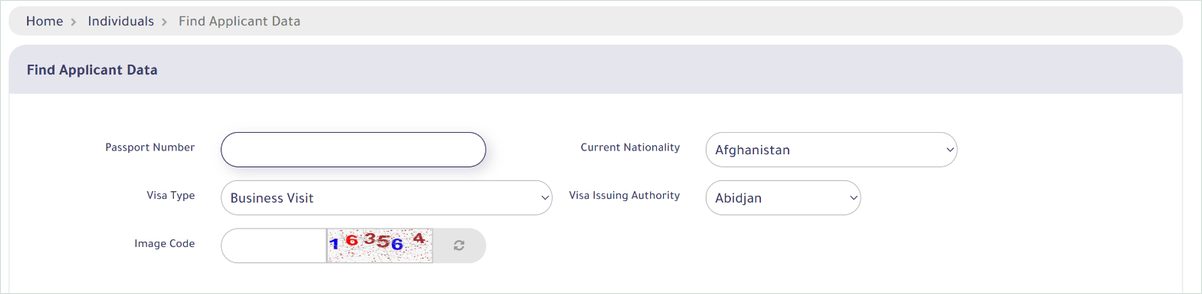
Do not have your visa number? The MOFA visa platform can find your application with just your passport details:
- Open visa.mofa.gov.sa and choose Find Applicant Data (switch the page to English with the “E” button).
- Enter your passport number and select your current nationality.
- Choose the visa type (for example work, business visit, family or Umrah).
- Select the visa issuing authority, which is the Saudi embassy or consulate that handles your visa in your country.
- Type the image code and search.
How to Print Your Saudi E-Visa
Saudi Arabia no longer puts visa stickers in passports for most countries. Since 2023, visas for Pakistan, India, Bangladesh, the Philippines, Nepal, Sri Lanka, Egypt and many other countries are issued as printed e-visas with a QR code. To print yours:
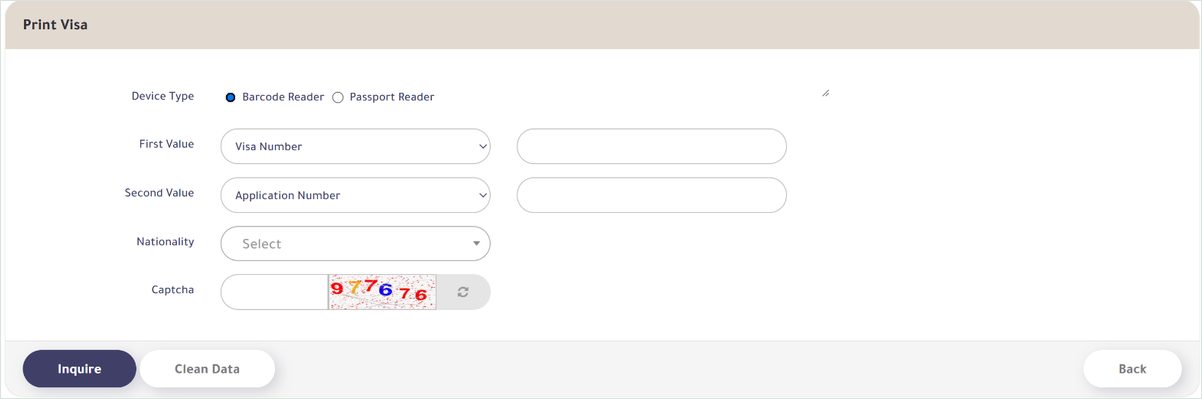
- Open Print Visa on the MOFA visa platform.
- In “First Value” and “Second Value”, choose two identifiers you have: visa number, passport number, application number, Ministry of Hajj reference number or first name.
- Select your nationality, type the captcha and click Inquire, then print the visa on A4 paper.
Which Saudi Visa Check Should You Use?
| Visa | Best way to check |
|---|---|
| Work visa (company) | KSA Visa tracker with visa number + passport number, or MOFA Find Applicant Data |
| Domestic worker visa | Employer checks on Musaned; the worker can track on KSA Visa with the visa number |
| Family visit visa | Visitor: KSA Visa tracker; the inviter in Saudi Arabia: MOFA platform login with Nafath |
| Umrah visa | KSA Visa tracker or MOFA Print Visa |
| Hajj visa | MOFA Print Visa with the Ministry of Hajj reference number + passport number |
| Tourist e-visa | KSA Visa tracker; use “resend by email” if you lost it |
| Exit re-entry (residents) | Absher or Muqeem; see our exit re-entry guide |
Saudi Visa Check for a Work Visa From Your Employer
For company jobs, the employer requests the visa through Qiwa and then authorises a recruitment agency or the embassy to process it on the MOFA platform. As a worker abroad you do not need to log in anywhere: ask your employer or agent for the visa number, then use the KSA Visa tracker with your passport number.
Your visa cannot move forward until your medical examination is fit and linked to the file. If the tracker shows the medical as not passed, check your result first; see our guide to the Wafid (GAMCA) medical report check.
Saudi Visa Check for Domestic Workers (Musaned)
Visas for house drivers, maids and other domestic workers are issued through Musaned. The employer checks the status on musaned.gov.sa with his own ID or Iqama number, his date of birth or Iqama expiry date (Hijri) and the request ID. The worker’s passport number is not used for this check.
Is Enjaz Still Working?
No. The old enjazit.com.sa website no longer opens. Enjaz services, such as visa authorisations to recruitment offices, are now inside the MOFA visa platform at visa.mofa.gov.sa, and visa tracking has moved to KSA Visa. Be careful with websites that still claim to offer an “Enjaz visa check”.
Already Living in Saudi Arabia?
- Check your exit re-entry visa status and fees.
- Find your Iqama details with your border number.
- Bringing family to visit? Read how to apply for a family visit visa and extend a visit visa.
- Need Absher? Follow our Absher registration guide.
Saudi Visa Check Problems and Fixes
| Problem | What to do |
|---|---|
| No result found | Check that you chose the right nationality, visa type and issuing embassy, and that the visa has actually been issued. |
| Wrong number type | KSA Visa accepts the visa number or the application number; MOFA Print Visa lets you choose which identifiers you enter. |
| Captcha keeps failing | Refresh the image code and type it again carefully. |
| Medical not passed | Check your Wafid result with your passport number and contact your medical centre or agent. |
Frequently Asked Questions
How can I check my Saudi visa online by passport number?
Use the KSA Visa platform (ksavisa.sa): open Track Application and enter your visa or application number and your passport number. If you only have your passport number, use “Find Applicant Data” on visa.mofa.gov.sa with your passport number, nationality, visa type and the embassy that issued the visa.
Can I check my Saudi visa with only my passport number?
Yes. The MOFA visa platform’s “Find Applicant Data” service needs only your passport number, current nationality, visa type and visa issuing authority, plus the image code. No login is needed.
How do I check a Saudi work visa issued by my employer?
Ask your employer or agent for the visa or application number, then track it on ksavisa.sa with your passport number. The tracker also shows whether your Wafid medical certificate has passed.
Is enjazit.com.sa still working?
No. The old Enjaz website no longer opens. Its services are now part of the Ministry of Foreign Affairs visa platform at visa.mofa.gov.sa and the KSA Visa platform.
How do I print my Saudi e-visa?
Go to Print Visa on visa.mofa.gov.sa, choose two identifiers such as your visa number and passport number, select your nationality, type the captcha and click Inquire. Saudi Arabia now issues printed e-visas with a QR code instead of passport stickers.
How do I check a domestic worker visa?
Domestic worker visas are issued through Musaned. The employer checks the status on musaned.gov.sa with his ID number, date of birth or Iqama expiry date and the request ID.
My visa shows medical not passed. What now?
The visa cannot proceed until your Wafid medical certificate is fit and linked to the application. Check your result on wafid.com with your passport number and contact your agent or medical centre.